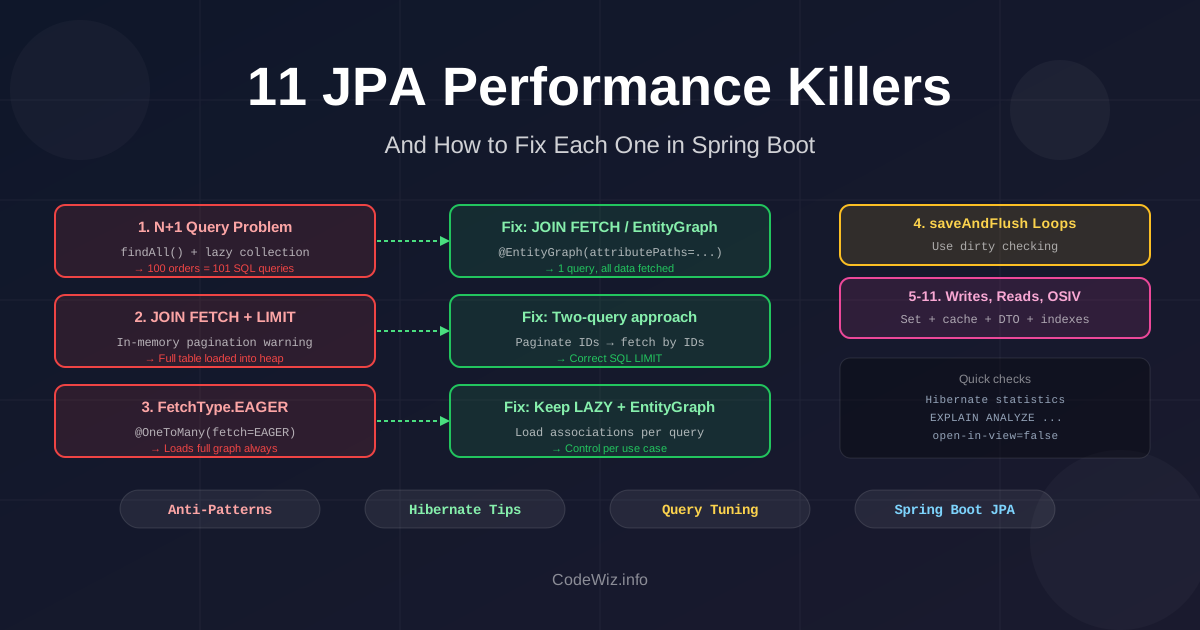
JPA makes database access easy. That's exactly why it gets dangerous in production. The abstraction hides SQL, flushes, fetch plans, and connection lifetime, then one endpoint that looked harmless in dev starts loading 200 orders in 8 seconds.
These anti-patterns show up in Spring Data JPA apps again and again. They line up with the usual advice from Hibernate performance experts, but this version also calls out the Hibernate 6/7-era fixes that are worth knowing.
The first performance bug is not a query. It's flying blind.
Small dev databases hide bad fetch plans. A repository method that runs 2 queries locally might run 202 queries when the result set grows. Before tuning anything, make Hibernate show you what it is doing.
spring.jpa.properties.hibernate.generate_statistics=true
logging.level.org.hibernate.SQL=DEBUG
logging.level.org.hibernate.orm.jdbc.bind=TRACE
logging.level.org.hibernate.stat=DEBUG
In Hibernate 6, org.hibernate.orm.jdbc.bind is the useful logger for bind values.
This is the most common and the most impactful. You load a list of entities, then for each entity, JPA fires a separate query to load a related association. One query becomes N+1 queries.
Here's what it looks like with a simple order list:
@Entity
public class Order {
    @Id Long id;

    @ManyToOne(fetch = FetchType.LAZY)
    private Customer customer;

    @OneToMany(mappedBy = "order")
    private List<LineItem> lineItems; // fetched separately per order
}

// In a service:
List<Order> orders = orderRepository.findAll(); // Query 1: SELECT * FROM orders

for (Order order : orders) {
    // Each access fires a query: SELECT * FROM line_items WHERE order_id = ?
    order.getLineItems().size(); // Query 2, 3, 4... up to N+1
}
With 100 orders, that loop can hit the database 101 times.
Fix 1: JOIN FETCH in JPQL
@Query("SELECT DISTINCT o FROM Order o JOIN FETCH o.lineItems WHERE o.status = :status")
List<Order> findWithLineItems(@Param("status") String status);
One query with a JOIN — all data loaded in one round trip.
Fix 2: Entity Graph
@EntityGraph(attributePaths = {"lineItems", "customer"})
List<Order> findByStatus(String status);
Entity graphs let you define fetch strategy per query without modifying the mapping. Prefer this over changing fetch = FetchType.EAGER on the entity itself — eager on the entity always fetches eagerly, even when you don't need it.
Fix 3: Batch fetching
When JOIN FETCH isn't practical (pagination conflicts — more on that below), use batch fetching:
import org.hibernate.annotations.BatchSize;

@Entity
public class Order {
    @OneToMany(mappedBy = "order")
    @BatchSize(size = 50) // Hibernate fetches 50 at a time instead of 1
    private List<LineItem> lineItems;
}
Or globally in application.properties:
spring.jpa.properties.hibernate.default_batch_fetch_size=50
I usually start around 25 or 50. Very large batch sizes create huge IN (...) lists and can hurt the database plan.
JOIN FETCH with paginationThis one catches developers who fixed their N+1 problem but introduced a subtler bug.
You add JOIN FETCH to load orders with their line items, then add pagination. Hibernate prints a warning you might have ignored:
HHH90003004: firstResult/maxResults specified with collection fetch; applying in memory
What's happening: Hibernate can't translate LIMIT 10 into SQL correctly when JOIN FETCH is involved — because a JOIN FETCH on a collection multiplies rows. An order with 5 line items becomes 5 rows. If you LIMIT 10 in SQL, you might get 2 complete orders and 0 others — not what you want.
So Hibernate fetches ALL data into memory and then applies the limit in Java. For large tables, this is an OOM waiting to happen.
// This looks correct but is dangerous:
@Query("SELECT DISTINCT o FROM Order o JOIN FETCH o.lineItems")
Page<Order> findAll(Pageable pageable); // Warning: in-memory pagination
Turn the warning into a failure in dev and test:
spring.jpa.properties.hibernate.query.fail_on_pagination_over_collection_fetch=true
Fix 1: Two-query approach
// Step 1: paginate IDs only (simple, fast, correct)
@Query(value = "SELECT o.id FROM Order o",
       countQuery = "SELECT COUNT(o) FROM Order o")
Page<Long> findOrderIds(Pageable pageable);

// Step 2: load full entities for those IDs with JOIN FETCH
@Query("SELECT DISTINCT o FROM Order o JOIN FETCH o.lineItems WHERE o.id IN :ids")
List<Order> findWithLineItemsByIds(@Param("ids") List<Long> ids);
The second query returns rows in database order, not necessarily the page order. Re-sort in the service if the order matters:
List<Long> ids = page.getContent();
Map<Long, Order> byId = orders.stream()
        .collect(Collectors.toMap(Order::getId, Function.identity()));

List<Order> sorted = ids.stream()
        .map(byId::get)
        .filter(Objects::nonNull)
        .toList();
Fix 2: Hibernate 6+ window functions
Hibernate 6 added stronger HQL support for window functions, so a top-N fetch can be expressed in one query:
@Query("""
    SELECT DISTINCT o
    FROM Order o
    LEFT JOIN FETCH o.lineItems
    WHERE o.id IN (
        SELECT ranked.id
        FROM (
            SELECT o2.id AS id,
                   dense_rank() OVER (ORDER BY o2.createdAt DESC) AS ranking
            FROM Order o2
            WHERE o2.status = :status
        ) ranked
        WHERE ranked.ranking <= :limit
    )
    """)
List<Order> findTopWithLineItems(@Param("status") String status,
                                 @Param("limit") int limit);
Use this for top-N queries. For normal page N of M, the two-query pattern or keyset pagination is still easier to reason about.
FetchType.EAGER and default eager to-one associationsThis is usually baked in from the beginning. Someone sets @OneToMany(fetch = FetchType.EAGER) to "avoid lazy loading issues", or leaves @ManyToOne and @OneToOne on their JPA defaults. Now every query loads more graph than the use case asked for.
import jakarta.persistence.Entity;
import jakarta.persistence.FetchType;
import jakarta.persistence.ManyToOne;
import jakarta.persistence.OneToMany;

import java.util.List;
import java.util.Optional;

@Entity
public class Customer {
    @OneToMany(fetch = FetchType.EAGER) // loaded on every customer fetch
    private List<Order> orders;

    @OneToMany(fetch = FetchType.EAGER) // also loaded on every customer fetch
    private List<Address> addresses;
}
Loading a customer for a simple display now fires three queries and returns potentially thousands of rows. If your customer report loops over 500 customers, that's 500 × 3 queries minimum.
Defaults in JPA:
@ManyToOne / @OneToOne — EAGER by default@OneToMany / @ManyToMany — LAZY by defaultHibernate will also throw MultipleBagFetchException if you try to EAGER-load more than one collection simultaneously:
org.hibernate.loader.MultipleBagFetchException: cannot simultaneously fetch multiple bags
Fix: Keep associations lazy, fetch per use case
@Entity
public class Customer {
    @OneToMany(mappedBy = "customer", fetch = FetchType.LAZY) // explicit
    private List<Order> orders;
}

@Entity
public class Order {
    @ManyToOne(fetch = FetchType.LAZY)
    private Customer customer;
}

// Load with items only when needed
@EntityGraph(attributePaths = "orders")
Optional<Customer> findWithOrdersById(Long id);

// Simple load without items
Optional<Customer> findById(Long id); // no orders loaded
This gives you control per query instead of baking the fetch strategy into every load.
saveAndFlush() for every updateSpring Data JPA's saveAndFlush() looks harmless. It is not.
Inside a transaction, managed entities are dirty-checked and flushed automatically before commit. Calling saveAndFlush() in a loop forces Hibernate to flush the entire persistence context repeatedly.
@Transactional
public void renameCustomers(List<Long> ids) {
    for (Long id : ids) {
        Customer customer = customerRepository.findById(id).orElseThrow();
        customer.rename("Archived");
        customerRepository.saveAndFlush(customer); // forces a flush every iteration
    }
}
If 100 customers are managed, every flush checks the managed context. You also break Hibernate's ability to group similar JDBC statements efficiently.
Fix: rely on dirty checking
@Transactional
public void renameCustomers(List<Long> ids) {
    List<Customer> customers = customerRepository.findAllById(ids);

    for (Customer customer : customers) {
        customer.rename("Archived");
    }
}
Use flush() only when you need a database constraint to be checked before the transaction ends, or when a later query in the same transaction must see the changes immediately.
ID generation affects insert throughput. On databases with sequences, prefer SEQUENCE with an allocation size that matches your write pattern:
import jakarta.persistence.Entity;
import jakarta.persistence.GeneratedValue;
import jakarta.persistence.GenerationType;
import jakarta.persistence.Id;
import jakarta.persistence.SequenceGenerator;

@Entity
public class Payment {
    @Id
    @GeneratedValue(strategy = GenerationType.SEQUENCE, generator = "payment_seq")
    @SequenceGenerator(
            name = "payment_seq",
            sequenceName = "payment_sequence",
            allocationSize = 50
    )
    private Long id;
}
Hibernate can reserve a block of IDs and avoid asking the database for every single insert. This works well with JDBC batching:
spring.jpa.properties.hibernate.jdbc.batch_size=50
spring.jpa.properties.hibernate.order_inserts=true
spring.jpa.properties.hibernate.order_updates=true
GenerationType.IDENTITY is the right choice for databases that depend on auto-increment columns, but it usually prevents insert batching because Hibernate needs the generated key immediately after each insert. Avoid GenerationType.AUTO unless you have checked what your dialect actually chooses.
Fetching a managed entity is useful when you plan to modify it. For a read-only list page, it is often waste: Hibernate selects all mapped columns, creates entity instances, stores snapshots for dirty checking, and keeps them in the persistence context.
This is worse with complex Spring Data interface projections that include nested associations or SpEL expressions. They can silently fall back to loading full entities and related rows.
public interface OrderView {
    Long getId();
    String getStatus();
    CustomerView getCustomer(); // nested association can trigger extra fetching
}
Fix: use DTO projections for read models
import java.math.BigDecimal;

public record OrderSummary(
        Long id,
        String status,
        String customerEmail,
        BigDecimal total
) {}

@Query("""
    SELECT new com.example.OrderSummary(o.id, o.status, c.email, o.total)
    FROM Order o
    JOIN o.customer c
    WHERE o.status = :status
    ORDER BY o.createdAt DESC
    """)
List<OrderSummary> findSummariesByStatus(@Param("status") String status);
DTO projections select the columns you ask for and skip entity lifecycle overhead. Interface projections are fine for simple scalar fields, but I avoid nested interface projections on hot paths unless SQL logs prove they stay lean.
ListThis one is easy to miss because List feels like the default Java collection. In Hibernate, a many-to-many List without an order column is treated like a bag: unordered, duplicate-friendly, and hard to diff efficiently.
@Entity
public class Book {
    @ManyToMany
    private List<Author> authors = new ArrayList<>();
}
Remove one author from that list and Hibernate may delete all rows for that book from the join table, then re-insert the remaining rows. You changed one relationship, but the SQL rewrites the whole collection.
It also makes MultipleBagFetchException more likely when you try to fetch more than one bag in the same query.
Fix: use Set for many-to-many
@Entity
public class Book {
    @ManyToMany
    private Set<Author> authors = new HashSet<>();
}
Most many-to-many relationships should not contain duplicates anyway. If order matters, model it explicitly with an order column or, better, promote the join table to a real entity such as BookAuthor.
Second-level cache and query cache can help, but they are not a general fix for bad fetch plans.
The second-level cache helps most when you load entities by ID. It does not magically make every custom JPQL query free. Query cache is even more specific: it works best for mostly static data, because changes to the underlying tables invalidate cached query results.
Hibernate version matters too. Hibernate 5 query cache stored entity identifiers, so a cached query could still trigger one select per entity if those entities were not in the second-level cache. Hibernate 6 changed the default query cache layout to store more complete row data, which avoids that old N+1 pattern but can make the cache much larger.
Fix: cache only stable, measured hotspots
@QueryHints(@QueryHint(
        name = "org.hibernate.cacheable",
        value = "true"
))
@Query("SELECT c FROM Country c ORDER BY c.name")
List<Country> findAllCached();
Use cache for reference data, permission metadata, feature flags, or small lookup tables. For request-specific list screens, DTO projections and better SQL usually beat cache complexity.
WHERE, JOIN, and ORDER BYJPA generates the schema for you with ddl-auto=update or create, but it only creates indexes you explicitly declare. If you query by email, status, customerId, or any foreign key column without an index, every query does a full table scan.
@Entity
public class Order {
    private String status;       // frequently filtered: WHERE status = ?
    private Long customerId;     // JOIN/filter: WHERE customer_id = ?
    private LocalDate orderDate; // sorted: ORDER BY order_date DESC
    // No indexes declared — all queries above are full table scans
}
For a table with 10 rows this is invisible. For a table with 10 million rows, a missing index on status turns a millisecond query into a 30-second one.
Fix: Declare indexes explicitly
@Entity
@Table(name = "orders", indexes = {
    @Index(name = "idx_orders_status", columnList = "status"),
    @Index(name = "idx_orders_customer_id", columnList = "customer_id"),
    @Index(name = "idx_orders_order_date", columnList = "order_date DESC"),
    @Index(name = "idx_orders_status_date", columnList = "status, order_date") // composite
})
public class Order {
    // ...
}
Or use Flyway/Liquibase to manage indexes explicitly — which you should be doing anyway rather than relying on ddl-auto.
-- V3__add_order_indexes.sql
CREATE INDEX idx_orders_status ON orders(status);
CREATE INDEX idx_orders_customer_id ON orders(customer_id);
CREATE INDEX idx_orders_status_date ON orders(status, order_date DESC);
Check slow queries: EXPLAIN ANALYZE in PostgreSQL or EXPLAIN in MySQL will show you if a query is doing a Seq Scan (full table) vs an Index Scan. Any query that appears in your logs with high execution time and no index hint is a candidate for optimization.
📚 Related: Database Indexes Deep Dive — covers index types, composite indexes, and partial indexes.
Spring Boot enables Open Session In View by default. What this means: the Hibernate EntityManager session stays open for the entire HTTP request lifecycle — through the controller, service, and view rendering layers.
The intent was to prevent LazyInitializationException by keeping the session available when the view template accesses lazy associations. The practical effect: lazy loads can fire during JSON serialization or template rendering, outside the service transaction, often as extra auto-commit queries at the worst possible point in the request.
Spring Boot logs a warning about this that most developers dismiss:
spring.jpa.open-in-view is enabled by default. This property allows
Hibernate to use the current application context during request processing.
This might cause performance and memory consumption issues.
Why it's a problem at scale:
Under high load, those late queries put pressure on the connection pool (HikariCP defaults to 10 connections) and make query ownership harder to reason about. The database work no longer belongs clearly to the service method that was supposed to define the transaction boundary.
Fix: Disable OSIV and handle lazy loading explicitly
spring.jpa.open-in-view=false
This will surface LazyInitializationException in places where your code was accidentally relying on lazy loading outside the transaction. That's good — it makes the dependency explicit. Fix them with:
// Option 1: JOIN FETCH / EntityGraph in repository
@EntityGraph(attributePaths = {"lineItems", "customer"})
Optional<Order> findWithDetailsById(Long id);

// Option 2: DTO projection — fetch only what you need
@Query("SELECT new com.example.OrderSummary(o.id, o.status, o.total) FROM Order o WHERE o.id = :id")
Optional<OrderSummary> findSummaryById(@Param("id") Long id);

// Option 3: Load inside @Transactional service method
@Transactional(readOnly = true)
public OrderDetail getOrderDetail(Long id) {
    Order order = orderRepository.findById(id).orElseThrow();
    Hibernate.initialize(order.getLineItems()); // explicit initialization
    return mapper.toDetail(order);
}
DTO projections are the most efficient — only the fields you need cross the wire from the database, and you're not carrying an entity graph through the stack.
Not everything in Thorben Janssen's Spring I/O 2025 talk is a pure performance issue. A few are worse: they can give you stale results or delete more data than intended.
Bulk updates with @Modifying leave managed entities stale
@Modifying(flushAutomatically = true, clearAutomatically = true)
@Query("UPDATE Author a SET a.lastName = UPPER(a.lastName)")
int uppercaseLastNames();
Bulk JPQL updates and deletes go straight to the database. They do not update the managed entity instances already sitting in the persistence context. Use both flushAutomatically and clearAutomatically, or run the bulk operation in a clean transaction where stale managed entities are impossible.
JOIN FETCH is for initialization, not filtering the fetched collection
// Filters authors by book, but fetches the full books collection.
@Query("""
    SELECT DISTINCT a
    FROM Author a
    JOIN a.books b
    LEFT JOIN FETCH a.books
    WHERE b.id = :bookId
    """)
List<Author> findAuthorsWithAllBooksForBook(@Param("bookId") Long bookId);
If you use the same JOIN FETCH in the WHERE predicate, Hibernate initializes a partial collection and your entity graph no longer represents the database row set you think it does. Join once for filtering, join fetch separately for initialization.
Bidirectional relationships need helper methods
public void addBook(Book book) {
    books.add(book);
    book.getAuthors().add(this);
}

public void removeBook(Book book) {
    books.remove(book);
    book.getAuthors().remove(this);
}
Updating only the inverse side can result in no database change. Updating only the owning side can leave the current persistence context with stale in-memory state.
Be careful with CascadeType.REMOVE
Only cascade remove from a true parent to a child that cannot exist independently. Do not put CascadeType.REMOVE on both sides of a many-to-many relationship. That can turn "delete one author" into a chain of deletes across books, authors, and the join table.
📚 Related: Spring Data JPA Cheat Sheet · Database Indexes Deep Dive · Offset vs Cursor Pagination
Comprehensive guide to Spring Data JPA with practical examples and best practices. Learn how to effectively use JPA in Spring Boot applications.
Complete guide to database indexes for developers. Learn how indexes work, types of indexes, and optimization strategies for better performance.
Learn the differences between offset and cursor-based pagination, their pros and cons, and how to implement both in Spring Boot applications with search capabilities.
Learn the basics of API caching and how to implement different caching strategies in a Spring Boot application. We will cover in-memory caching and distributed caching with Redis to improve the performance of your APIs.
Find the most popular YouTube creators in tech categories like AI, Java, JavaScript, Python, .NET, and developer conferences. Perfect for learning, inspiration, and staying updated with the best tech content.

Get instant AI-powered summaries of YouTube videos and websites. Save time while enhancing your learning experience.
