
GraphQL is a powerful query language and runtime for APIs that allows clients to request exactly the data they need. You can think of GraphQL as SQL for APIs where you can select the fields and join the data you need based on a schema. In this comprehensive guide, we'll explore GraphQL fundamentals and build a complete event booking application using Java and Spring Boot.
Before we dive into GraphQL, let's have a look at the evolution of API technologies.
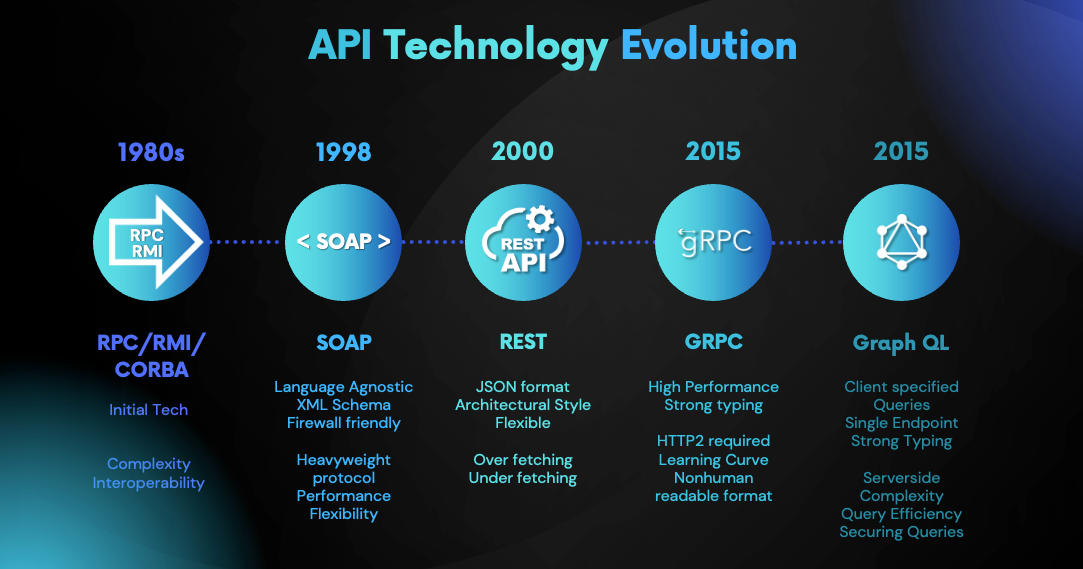
Initially, we had technologies like CORBA (Common Object Request Broker Architecture) and RMI (Remote Method Invocation) for building distributed systems. These technologies were complex and had limitations like language-specific bindings and lack of interoperability.
Then SOAP (Simple Object Access Protocol) was introduced as a standard for exchanging structured information in XML format. SOAP messages were typically sent over HTTP, but they were verbose and complex.
Introduction of REST completely changed the way APIs were built. In REST we identify resources using URIs and use standard HTTP methods like GET, POST, PUT, DELETE to interact with the server. REST APIs are easy to understand and implement and easy to integrate with web applications. REST APIs usually use JSON for data serialization and continue to be most widely used for building APIs.
However, like any other technology REST APIs also have some limitations which make them not suitable for some use cases. gRPC and GraphQL emerged as alternatives to address such scenarios.
Related topics:
Before diving into GraphQL, let's have a look at how traditional REST APIs work:
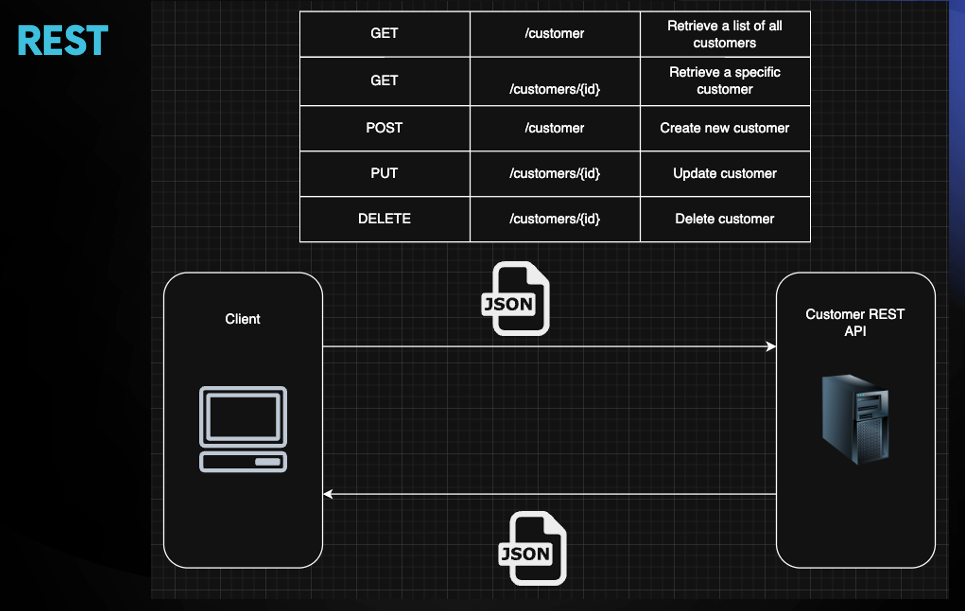
In REST a resource is identified by a URI (Uniform Resource Identifier), and clients interact with the server using standard HTTP methods like GET, POST, PUT, DELETE. The server sends responses usually in JSON format. REST mostly use HTTP/1.1 for transport.
While REST is simple and widely adopted, it has limitations for some use cases:
GraphQL emerged as a solution to these problems at Facebook and then it was open-sourced in 2015.
GraphQL is a query language and runtime for APIs that provides a complete and understandable description of the data in your API. It gives clients the power to ask for exactly what they need and nothing more, making it easier to evolve APIs over time.
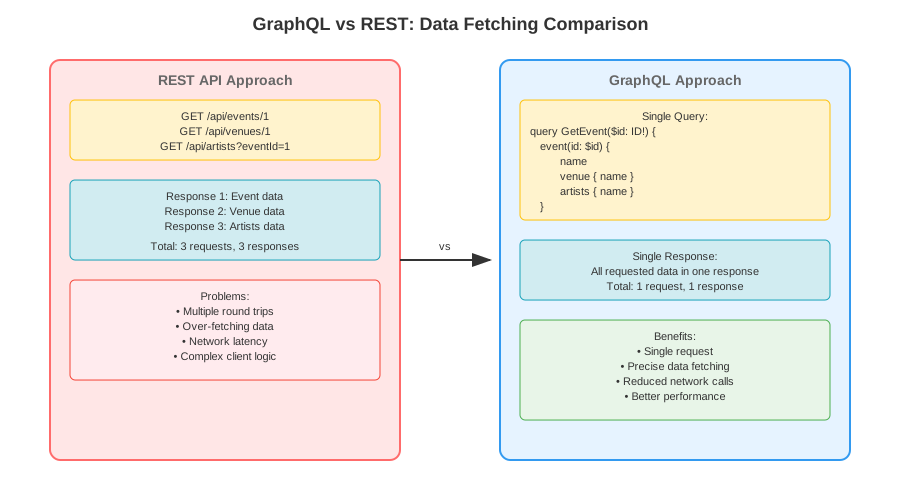
To get event details with venue information using REST:
# Multiple requests needed
GET /api/events/1
GET /api/venues/1
GET /api/artists?eventId=1
The same data with GraphQL:
query GetEventDetails($id: ID!) {
  event(id: $id) {
    id
    name
    description
    venue {
      name
      address
      capacity
    }
    artists {
      name
      bio
    }
  }
}
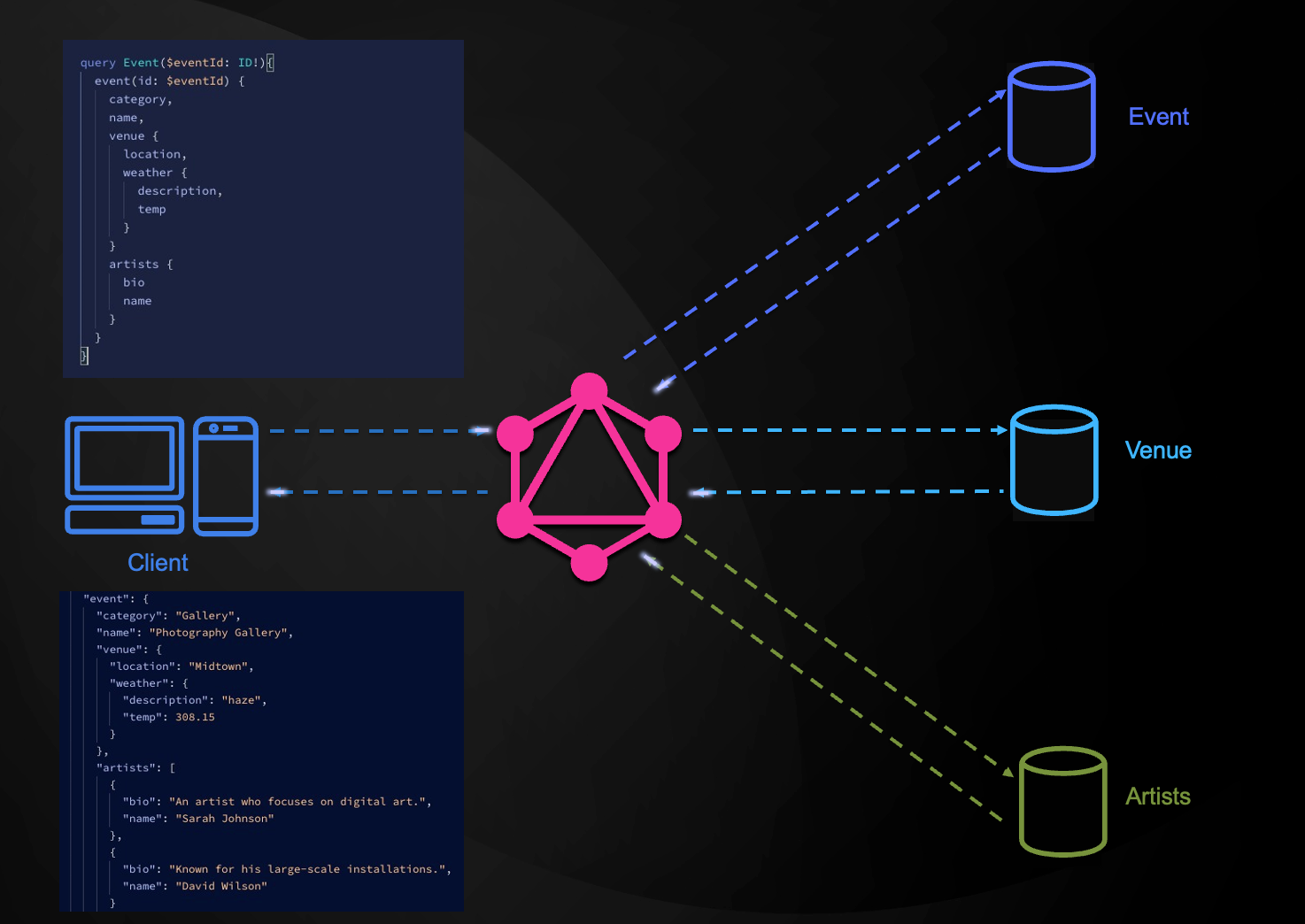
When a client sends a GraphQL query, the server intelligently parses the request to understand which backend services need to be queried. It then fetches data from multiple sources (like Event, Venue, and Artists services) in parallel, aggregates all the responses according to the query structure, and returns a single, unified JSON response. This eliminates the need for multiple API calls, reduces network traffic, and provides clients with exactly the data they need in one request.
GraphQL uses a schema to define the structure of your API:
type Event {
  id: ID!
  name: String!
  description: String
  eventDate: String!
  venue: Venue!
  artists: [Artist!]!
}

type Venue {
  id: ID!
  name: String!
  address: String!
  capacity: Int!
}

type Artist {
  id: ID!
  name: String!
  bio: String
}


type Query {
    events: [Event!]!
    event(id: ID!): Event
    venues: [Venue!]!
    venue(id: ID!): Venue
}

type Mutation {
    createVenue(venueInput: VenueInput!): Venue!
    createEvent(eventInput: EventInput!): Event!
}
In schema definition language (SDL), we define the schema for the API which includes the data types and the operations that can be performed on the data.
Data Types:
The schema starts by defining core data types (like Event, Venue, Artist), similar to how you define classes in Java. These outline the shape of the data you can query or mutate.
Root Types:
Related topics:
Queries are used to read data from the server. They are analogous to GET requests in REST.
Basic Query Example:
query GetAllEvents {
  events {
    id
    name
    description
    eventDate
  }
}
Query with Variables:
query GetEvent($id: ID!) {
  event(id: $id) {
    id
    name
    description
    venue {
      name
      address
    }
  }
}
Nested Query Example:
query GetEventWithDetails($id: ID!) {
  event(id: $id) {
    id
    name
    description
    venue {
      name
      address
      capacity
      weather {
        temp
        description
      }
    }
    artists {
      name
      bio
      imageUrl
    }
  }
}
Mutations are used to modify data on the server, similar to POST, PUT, DELETE requests in REST.
Create Event Mutation:
mutation CreateEvent($eventInput: EventInput!) {
  createEvent(eventInput: $eventInput) {
    id
    name
    description
    eventDate
    venue {
      name
    }
  }
}
Input Type Example:
input EventInput {
  name: String!
  description: String!
  eventDate: String!
  category: String!
  venueId: Int!
  artistIds: [Int!]!
}
Subscriptions are a feature that enables real-time, event-driven communication between a GraphQL server and its clients. Unlike queries, which fetch data once, and mutations, which modify data, subscriptions establish a persistent connection, allowing the server to push updates to the client as specific events occur on the server-side. For example, in our event booking application, we can subscribe to event updates so that when a new event is created, the client receives a notification. Below is an example of a subscription to the eventCreated event.
subscription SubscribeToEventUpdates {
    eventCreated {
        id
        name
        description
    }
}
Now let's build an event booking application using Spring Boot and Spring GraphQL.
Create a new Spring Boot project with the following dependencies:
<dependencies>
    <dependency>
        <groupId>org.springframework.boot</groupId>
        <artifactId>spring-boot-starter-graphql</artifactId>
    </dependency>
    <dependency>
        <groupId>org.springframework.boot</groupId>
        <artifactId>spring-boot-starter-data-jdbc</artifactId>
    </dependency>
    <dependency>
        <groupId>org.springframework.boot</groupId>
        <artifactId>spring-boot-starter-webmvc</artifactId>
    </dependency>
    <dependency>
        <groupId>org.postgresql</groupId>
        <artifactId>postgresql</artifactId>
        <scope>runtime</scope>
    </dependency>
</dependencies>
spring-boot-starter-graphql is the Spring Boot starter for GraphQL. It provides a comprehensive set of features for building GraphQL APIs in Spring Boot. This uses the GraphQL Java implementation under the hood.
We will use PostgreSQL as the database. Create a docker-compose.yml for PostgreSQL:
services:
  postgres:
    image: 'postgres:latest'
    environment:
      - 'POSTGRES_DB=eventbooking'
      - 'POSTGRES_PASSWORD=secret'
      - 'POSTGRES_USER=eventuser'
    ports:
      - '5432:5432'
    restart: unless-stopped
Create src/main/resources/graphql/schema.graphqls:
type Query {
    events: [Event!]!
    event(id: ID!): Event
    venues: [Venue!]!
    venue(id: ID!): Venue
    bookings(eventId: Float!): [Booking!]!
}

type Mutation {
    createUser(userInput: UserInput!): User!
    createVenue(venueInput: VenueInput!): Venue!
    createEvent(eventInput: EventInput!): Event!
    createBooking(bookingInput: BookingInput!): Booking!
}

type Event {
    id: ID!
    name: String!
    description: String!
    eventDate: String!
    category: String!
    imageUrl: String
    venueId: Int!
    venue: Venue!
    artists: [Artist!]!
}

type Venue {
    id: ID!
    name: String!
    address: String!
    location: String!
    capacity: Int!
    events: [Event!]!
    weather: Weather!
}

type Artist {
    id: ID!
    name: String!
    bio: String!
    imageUrl: String
    events: [Event!]!
}

type Booking {
    id: ID!
    bookingDate: String!
    eventId: Int!
    userId: Int!
    price: Float!
    tickets: [Ticket!]!
}

type Ticket {
    id: ID!
    seatNo: Int!
    bookingId: Int!
    booking: Booking!
}

type Weather {
    temp: Float!
    feels_like: Float!
    temp_min: Float!
    temp_max: Float!
    humidity: Float!
    description: String!
}

input EventInput {
    name: String!
    description: String!
    eventDate: String!
    category: String!
    imageUrl: String
    venueId: Int!
    artistIds: [Int!]!
}

input BookingInput {
    eventId: Int!
    seats: [Int!]!
}
Define your domain entities:
@Table("events")
public record Event(@Id Long id, String name, String description,
                   LocalDateTime eventDate, String category, String imageUrl, Long venueId) {
    public Event(String name, String description, LocalDateTime eventDate,
                String category, String imageUrl, Long venueId) {
        this(null, name, description, eventDate, category, imageUrl, venueId);
    }
}

@Table("venues")
public record Venue(@Id Long id, String name, String address,
                   String location, Integer capacity) {
    public Venue(String name, String address, String location, Integer capacity) {
        this(null, name, address, location, capacity);
    }
}

@Table("artists")
public record Artist(@Id Long id, String name, String bio, String imageUrl) {
    public Artist(String name, String bio, String imageUrl) {
        this(null, name, bio, imageUrl);
    }
}
Create repository interfaces:
@Repository
public interface EventRepository extends CrudRepository<Event, Long> {
}

@Repository
public interface VenueRepository extends CrudRepository<Venue, Long> {
}

@Repository
public interface ArtistRepository extends CrudRepository<Artist, Long> {
    @Query("SELECT a.* FROM artists a JOIN event_artists ea ON a.id = ea.artist_id WHERE ea.event_id = :eventId")
    List<Artist> findByEventId(@Param("eventId") Long eventId);
}
Implement GraphQL resolvers using Spring annotations:
@Controller
public class EventController {

    private final EventRepository eventRepository;
    private final VenueRepository venueRepository;
    private final ArtistRepository artistRepository;
    private final EventArtistRepository eventArtistRepository;

    public EventController(EventRepository eventRepository, VenueRepository venueRepository,
                         ArtistRepository artistRepository, EventArtistRepository eventArtistRepository) {
        this.eventRepository = eventRepository;
        this.venueRepository = venueRepository;
        this.artistRepository = artistRepository;
        this.eventArtistRepository = eventArtistRepository;
    }

    @QueryMapping
    public List<Event> events() {
        return (List<Event>) eventRepository.findAll();
    }

    @QueryMapping
    public Event event(@Argument String id) {
        return eventRepository.findById(Long.valueOf(id)).orElse(null);
    }

    @SchemaMapping
    public Venue venue(Event event) {
        return venueRepository.findById(event.venueId()).orElse(null);
    }

    @SchemaMapping
    public List<Artist> artists(Event event) {
        return artistRepository.findByEventId(event.id());
    }

    @MutationMapping
    public Event createEvent(@Argument EventInput eventInput) {
        Event event = new Event(eventInput.name(), eventInput.description(),
                               LocalDateTime.parse(eventInput.eventDate()),
                               eventInput.category(), eventInput.imageUrl(),
                               eventInput.venueId().longValue());
        Event savedEvent = eventRepository.save(event);

        // Create event-artist relationships
        for (Integer artistId : eventInput.artistIds()) {
            EventArtist eventArtist = new EventArtist(savedEvent.id(), artistId.longValue());
            eventArtistRepository.save(eventArtist);
        }

        return savedEvent;
    }
}
In the above Spring Boot GraphQL implementation, several annotations are used to bridge between your Java code and the GraphQL schema:
@QueryMapping: This annotation marks a method as a GraphQL query handler. Methods annotated with @QueryMapping provide data for queries defined in your GraphQL schema's type Query { ... }. They are responsible for fetching and returning data in response to client queries.
@MutationMapping: Methods annotated with this are responsible for handling mutations, which are operations that modify data (such as create, update, or delete). These correspond to the mutations defined in your schema's type Mutation { ... }.
@SchemaMapping: This annotation is used for resolving specific fields, especially nested or related data within types. For example, if your Event type has a venue field, a method with @SchemaMapping can specify how to retrieve the venue data for a given event.
@Argument: This annotation is used on method parameters to indicate that the parameter should be populated with a GraphQL argument from the query or mutation. It makes it easy to bind incoming values from the GraphQL request directly to method parameters.
Together, these annotations make it easy to map GraphQL queries, mutations, and type fields to strongly-typed Java methods, simplifying the development of GraphQL APIs in Spring Boot.
Sometimes we might need to fetch data from external services instead of the database. For example, in this example we will fetch weather data for Venues from the OpenWeatherMap API.
@Service
public class WeatherService {

    private final RestClient restClient;
    private final Map<String, Weather> weatherCache = new ConcurrentHashMap<>();

    @Value("${WEATHER_API_KEY:}")
    private String apiKey;

    public WeatherService() {
        this.restClient = RestClient.create();
    }

    public Weather getWeatherForLocation(String location) {
        if (weatherCache.containsKey(location)) {
            return weatherCache.get(location);
        }
        String geoUrl = "https://api.openweathermap.org/geo/1.0/direct?q={location}&limit=1&appid={apiKey}";
        record GeoData(double lat, double lon) {}
        var geoDataList = restClient.get()
                .uri(geoUrl, location, apiKey)
                .retrieve()
                .body(new ParameterizedTypeReference<List<GeoData>>() {});
        GeoData geoData = geoDataList.get(0);
        Double lat = geoData.lat;
        Double lon = geoData.lon;

        String weatherUrl = "https://api.openweathermap.org/data/2.5/weather?lat={lat}&lon={lon}&appid={apiKey}";
        record MainData(Double temp, Double feels_like, Double temp_min, Double temp_max, Integer humidity) {}
        record WeatherInfo(String description) {}
        record WeatherResponse(MainData main, List<WeatherInfo> weather) {}
        var weatherResponse = restClient.get()
                .uri(weatherUrl, lat, lon, apiKey)
                .retrieve()
                .body(WeatherResponse.class);

        var main = weatherResponse.main();
        var weatherInfo = weatherResponse.weather().get(0);
        var weatherData = new Weather(
            main.temp(),
            main.feels_like(),
            main.temp_min(),
            main.temp_max(),
            main.humidity(),
            weatherInfo.description()
        );
        weatherCache.put(location, weatherData);
        return weatherData;

    }

}
@Controller
public class VenueController {

    private final VenueRepository venueRepository;
    private final WeatherService weatherService;

    public VenueController(VenueRepository venueRepository, WeatherService weatherService) {
        this.venueRepository = venueRepository;
        this.weatherService = weatherService;
    }

    @QueryMapping
    public List<Venue> venues() {
        return (List<Venue>) venueRepository.findAll();
    }

    @QueryMapping
    public Venue venue(@Argument String id) {
        return venueRepository.findById(Long.valueOf(id)).orElse(null);
    }

    @SchemaMapping
    public Weather weather(Venue venue) {
        return weatherService.getWeatherForLocation(venue.location());
    }

    @MutationMapping
    public Venue createVenue(@Argument VenueInput venueInput) {
        Venue venue = new Venue(venueInput.name(), venueInput.address(),
                               venueInput.location(), venueInput.capacity().intValue());
        return venueRepository.save(venue);
    }
}
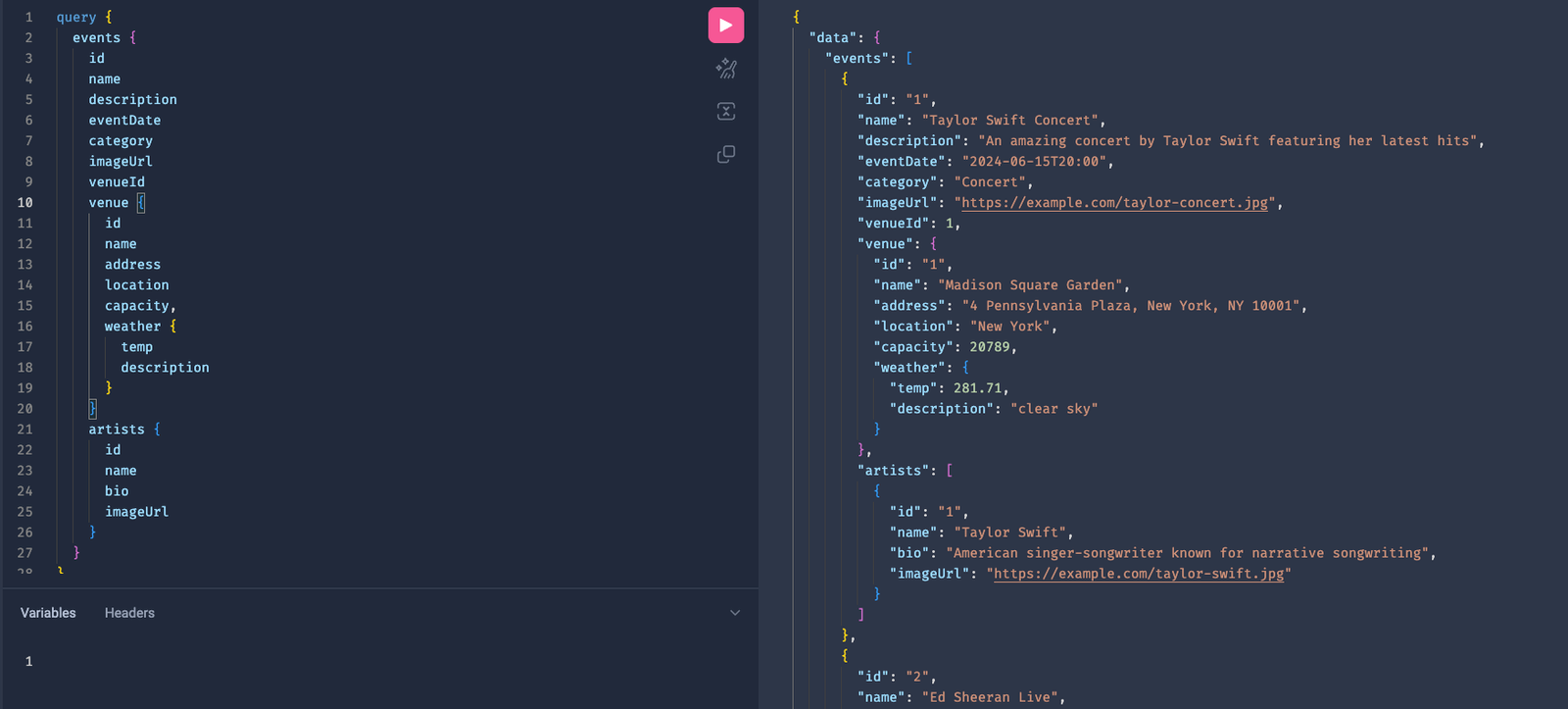
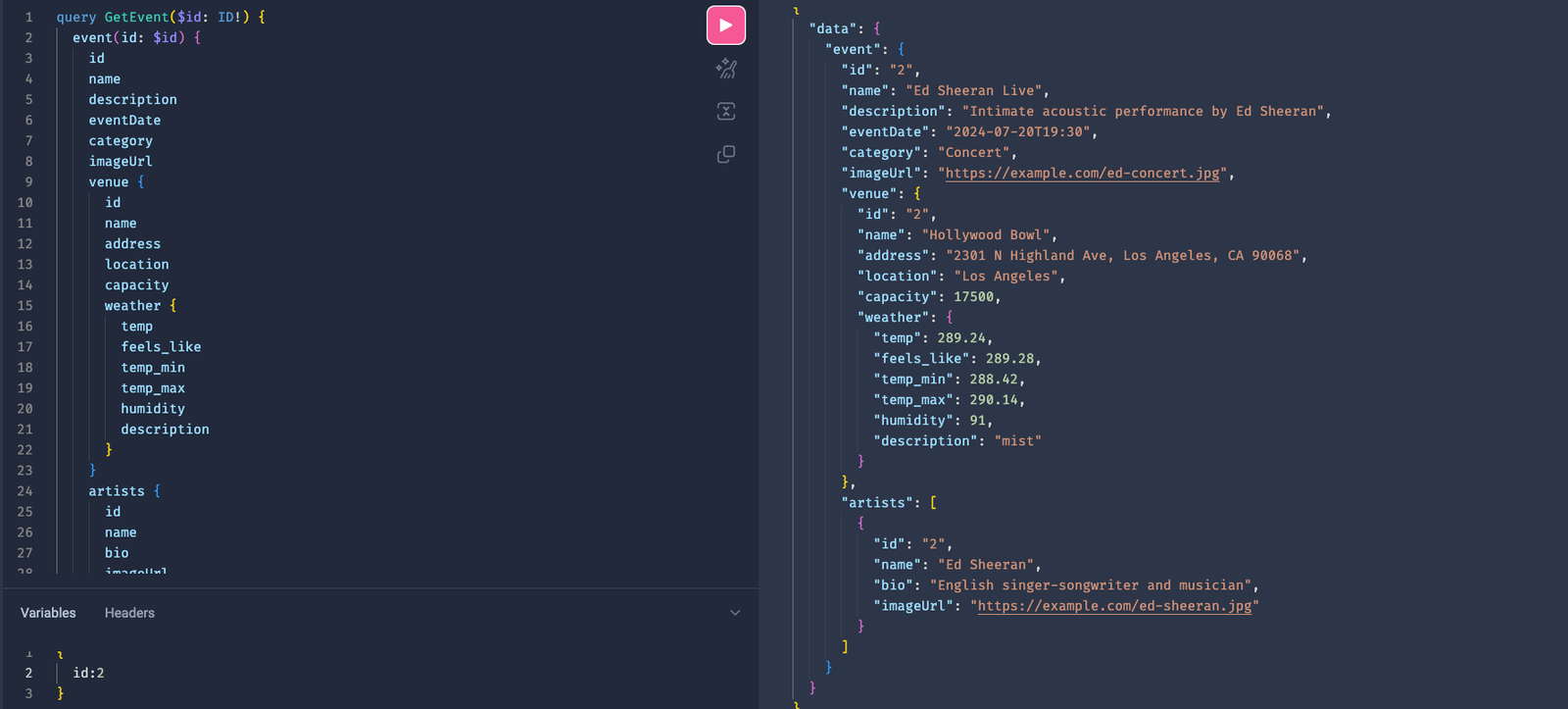
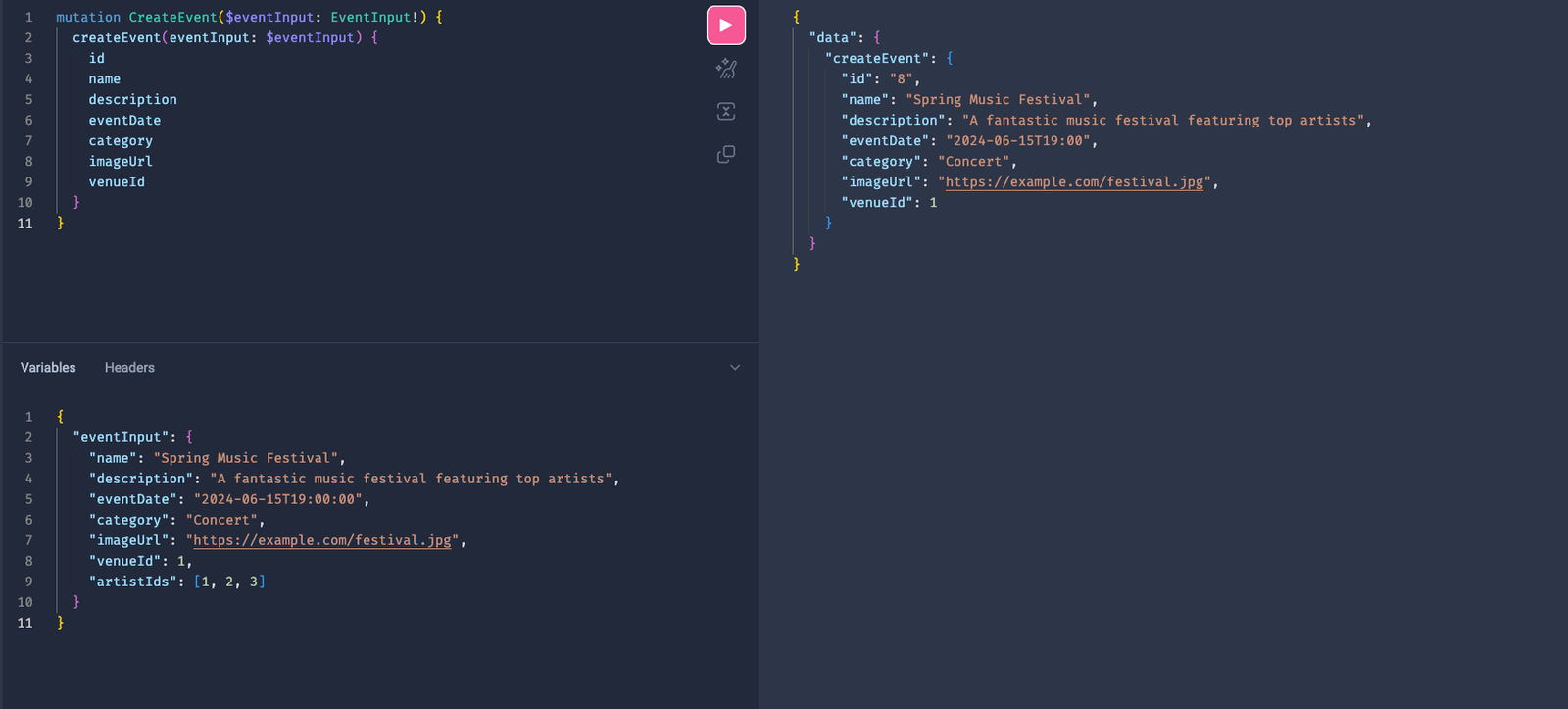
For manual testing of the GraphQL API, we can use the GraphiQL Playground. It is a tool that allows us to test the GraphQL API using a graphical interface.
Enable GraphiQL by adding this config to the application.properties file.
spring.graphql.graphiql.enabled=true
Below are some screenshots of the GraphiQL Playground:
GraphQL represents a significant evolution in API design, offering developers a more efficient and flexible way to build APIs. With its strong typing, precise data fetching, and excellent developer experience, GraphQL is particularly well-suited for modern applications with complex data requirements.
To stay updated with the latest updates in Java and Spring, follow us on LinkedIn and Medium.
You can find the source code for this blog on our GitHub Repository.
Learn the basics of gRPC and how to build gRPC microservices in Java and Spring Boot.
Learn how to build real-time applications using WebSockets in Spring Boot. This guide covers both simple WebSocket implementation and STOMP-based messaging, with practical examples of building a chat application.
Find the most popular YouTube creators in tech categories like AI, Java, JavaScript, Python, .NET, and developer conferences. Perfect for learning, inspiration, and staying updated with the best tech content.

Get instant AI-powered summaries of YouTube videos and websites. Save time while enhancing your learning experience.
