Spring AI is the most popular AI framework for building agents in JVM ecosystem. It seamlessly integrates with the rest of the Spring ecosystem and makes it really easy to integrate with all major LLMs.
In this tutorial, we're going to build a Stock Advisor Agent and learn key building blocks of Spring AI.
We'll cover the below concepts:
We'll start with a Spring Boot project. I'm using Java 25 here, but Java 17+ works fine. The key dependencies are spring-ai-starter-model-openai for the LLM interaction and spring-boot-starter-web for exposing our endpoints.
Here are the key dependencies in pom.xml:
<dependencies>
    <dependency>
        <groupId>org.springframework.boot</groupId>
        <artifactId>spring-boot-starter-web</artifactId>
    </dependency>
    <dependency>
        <groupId>org.springframework.boot</groupId>
        <artifactId>spring-boot-starter-data-jdbc</artifactId>
    </dependency>
    <dependency>
        <groupId>org.postgresql</groupId>
        <artifactId>postgresql</artifactId>
        <scope>runtime</scope>
    </dependency>
    <dependency>
        <groupId>org.springframework.ai</groupId>
        <artifactId>spring-ai-starter-model-openai</artifactId>
    </dependency>
</dependencies>
You can find the full pom.xml here.
Make sure you have your OPENAI_API_KEY set in your environment variables. Spring AI will pick this up automatically.
Here is the application.properties file:
spring.application.name=stockagent

spring.ai.openai.chat.api-key=${OPENAI_API_KEY}

# PostgreSQL Database Configuration
spring.datasource.url=jdbc:postgresql://localhost:5432/stock-agent-db
spring.datasource.username=stock-agent-user
spring.datasource.password=secret
spring.datasource.driver-class-name=org.postgresql.Driver

# Schema Initialization
spring.sql.init.mode=always
spring.sql.init.schema-locations=classpath:schema.sql

# Stock API Configuration
stock.api.key=${STOCK_API_KEY}
Here we are using OpenAI model. You can also switch to any other model or even local LLMs by just changing the dependency and adding the configuration for the model.
You can find the full application.properties here.
The heart of our agent is the ChatClient. Think of it as the fluent API wrapper that makes interacting with the AI model much smoother than raw HTTP calls.
It handles the heavy lifting of:
In the configuration below, you'll see two types of messages:
defaultSystem): This sets the "Persona" and "Rules". It's like the job description for the AI. We tell it: "You are a stock advisor," "Use Markdown," and "Always ask for confirmation." This context persists across every interaction.Here is how we configure it in StockAdvisorAssistant.java:
@Service
public class StockAdvisorAssistant {

    private final ChatClient chatClient;
    private static final String SYSTEM_MESSAGE = """
            You are a polite stock advisor assistant who provides advice based on
            the latest stock price, company information and financial results.
            When you are asked to create a stock order, ask for a confirmation before creating it.
            In the confirmation message, include the stock symbol, quantity, price, and current market price.
            All your responses should be in markdown format.
            When you are returning a list of items like position, orders, list of stocks etc, return them in a table format.
            """;

    public StockAdvisorAssistant(ChatClient.Builder chatClientBuilder) {
        this.chatClient = chatClientBuilder
                .defaultSystem(SYSTEM_MESSAGE)
                .build();
    }

    // ... methods ...
}
Notice the system message. I found that being very specific about formatting (like "return them in a table format") saves a ton of parsing headaches later. We inject the ChatClient.Builder which makes testing easier and allows Spring to pre-configure defaults.
An AI that can't access data is just a fancy text generator. Tools (also known as Function Calling in OpenAI land) is one of the approaches to bridge this gap.
In Spring AI, any Java method can be a tool. You just annotate it with @Tool.
Here's our StockInformationService that fetches real data using API from FMP:
@Service
public class StockInformationService {

    private static final Logger log = LoggerFactory.getLogger(StockInformationService.class);
    // ... dependencies ...

    @Tool(description = "Returns the stock price for the given stock symbol")
    public String getStockPrice(String stockSymbol) {
        log.info("Fetching stock price for stock symbols: {}", stockSymbol);
        return fetchData("/quote?symbol=" + stockSymbol);
    }

    @Tool(description = "Returns the company profile for the given stock symbol.")
    public String getCompanyProfile(String stockSymbol) {
        // implementation fetching from external API
        return fetchData("/profile?symbol=" + stockSymbol);
    }

    // ... other tools ...
}
The description in the @Tool annotation is critical. This is what the LLM sees to decide when and how to call this function. If you leave it vague, the model might hallucinate parameters or ignore the tool entirely.
We also have a StockOrderService to perform actions for storing and retrieving stock orders in the database:
@Service
public class StockOrderService {

    private final StockOrderRepository stockOrderRepository;

    @Tool(description = "Creates a new stock order. Input: StockOrder object with symbol, quantity, price, and orderType (BUY or SELL)")
    public StockOrder createOrder(StockOrder order) {
        // Saves to database using Spring Data JDBC
        return stockOrderRepository.save(order);
    }
}
This is the part that trips people up. You need to tell the ChatClient about these tools. We do this in our configuration class:
@Configuration
public class AssistantConfiguration {

    @Bean
    public ChatClient.Builder chatClientBuilder(org.springframework.ai.chat.model.ChatModel chatModel,
            ChatMemory chatMemory, StockInformationService stockInformationService, StockOrderService stockOrderService) {
        return ChatClient.builder(chatModel)
                .defaultAdvisors(MessageChatMemoryAdvisor.builder(chatMemory).build())
                .defaultTools(stockInformationService, stockOrderService);
    }
}
By calling .defaultTools(stockInformationService, stockOrderService), we make these beans available to every prompt sent by this client. The Spring AI handles the serialization of arguments and execution of the method automatically.
If you ask "What's the price of Apple?" and then follow up with "Buy 10 shares", a stateless LLM will ask "Buy 10 shares of what?".
To fix this, we need conversational memory. Spring AI handles this via Advisors.
Advisors in Spring AI are like interceptors or "middleware" for your Chat Client. They sit between your application and the AI model, allowing you to modify the request or response.
Common uses for Advisors include:
In our case, we use MessageChatMemoryAdvisor to automatically attach the conversation history to every request.
In the configuration above, we added:
.defaultAdvisors(MessageChatMemoryAdvisor.builder(chatMemory).build())
We configured a simple in-memory store that keeps the last 20 messages:
@Bean
public ChatMemory chatMemory() {
    return MessageWindowChatMemory.builder()
            .maxMessages(20)
            .build();
}
Now, when we call the chat client, we pass a conversationId to retrieve the correct history:
public String chat(String userMessage, String conversationId) {
    return chatClient.prompt()
            .user(userMessage)
            .advisors(a -> a.param(ChatMemory.CONVERSATION_ID, conversationId))
            .call()
            .content();
}
This simple addition makes the interaction feel human. The agent remembers we were talking about Apple stock without us repeating the ticker symbol.
In this example, we used MessageWindowChatMemory, which lives in the application's RAM. If you restart the server, the conversation is lost.
For production apps, you usually want to persist this history. Spring AI supports several options to store chat history externally without changing your memory advisor logic:
You would simply swap the ChatMemory bean with a persistent implementation, and the rest of your agent code remains exactly the same.
Now our agent is ready. We can test it by calling the chat url from browser or using curl or httpie.
But I've built a simple HTML frontend (included in the project source) to test our agent.
You can access the frontend at http://localhost:8080/index.html.
Here is how the conversation flows:
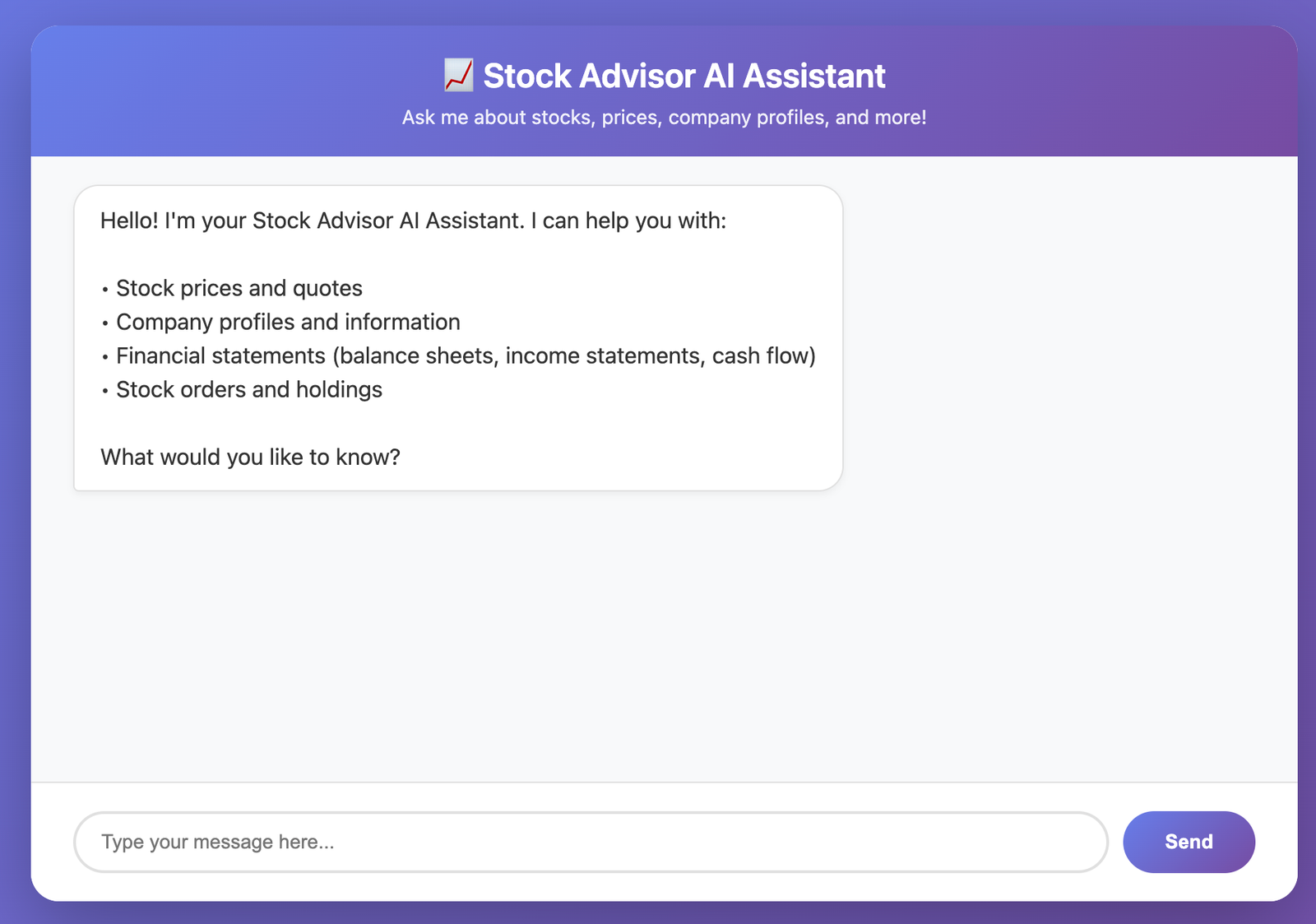 Figure 1: The agent welcomes us and lists its capabilities.
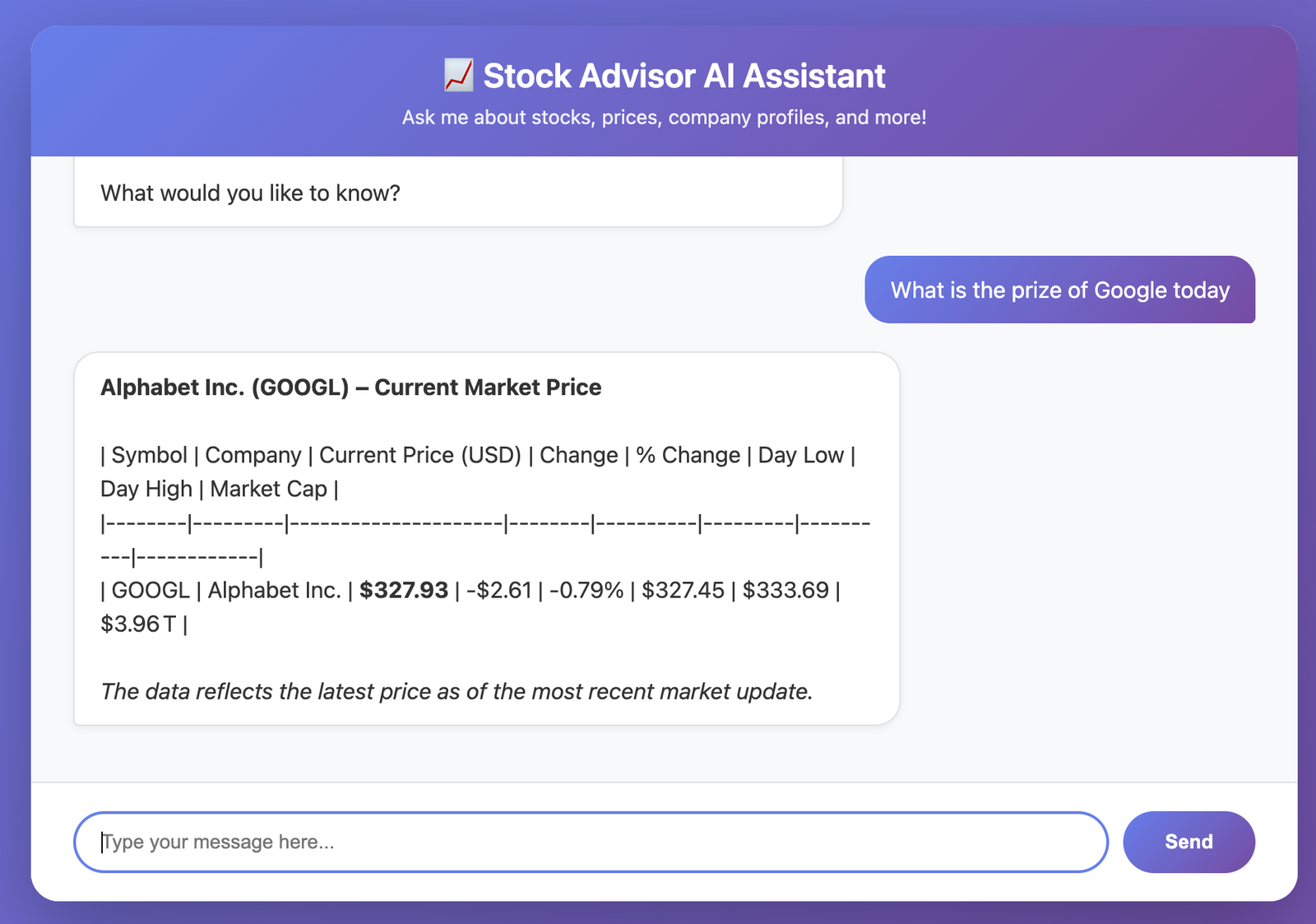 Figure 2: We ask for the price of Apple (AAPL), and the agent calls the
 getStockPrice tool.
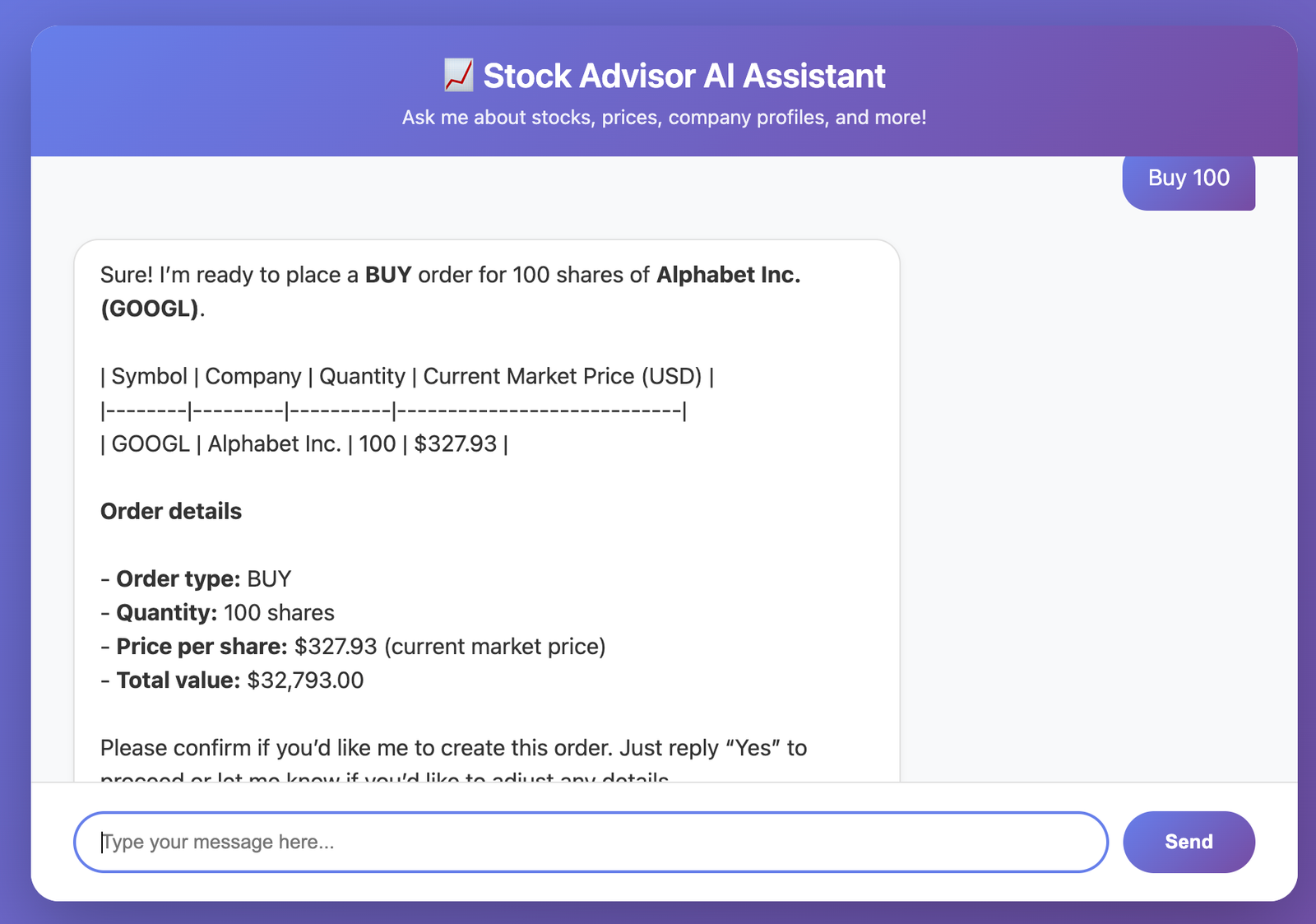 Figure 3: We ask to buy shares. Notice the agent asks for confirmation? That's the system prompt in action.
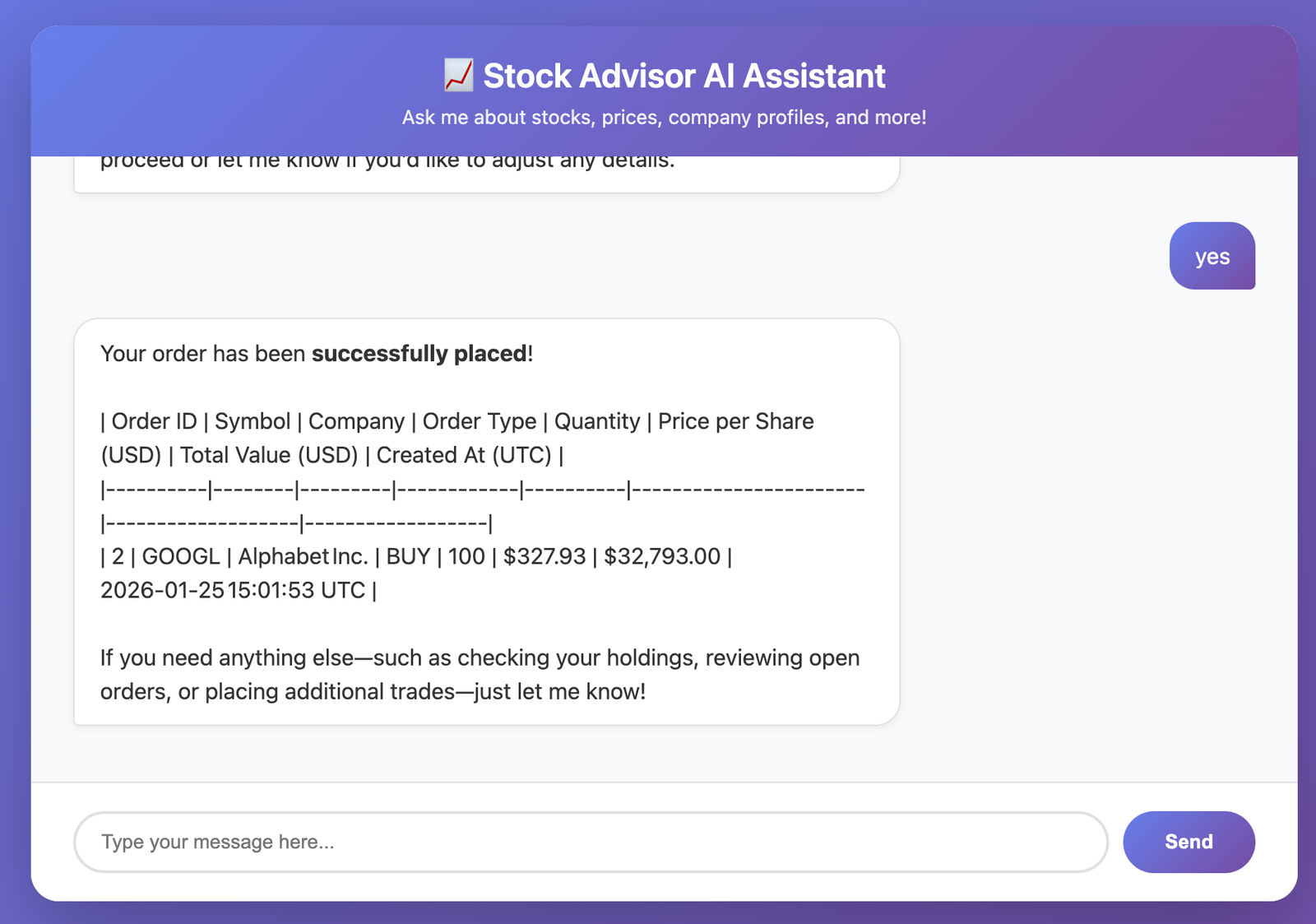 Figure 4: Once confirmed, the agent calls
 createOrder and returns the transaction details.
Sometimes you don't want a chat response; you want data you can use in your code. For example, if I ask for "3 stock picks for a growth strategy", I want a JSON array, not a paragraph of text.
Spring AI handles this beautifully with the .entity() method.
public List<StockPick> getStockPicks(String strategy, int count) {
    return chatClient.prompt()
            .user(u -> u.text("Suggest {count} stock picks for a {strategy} portfolio. Return symbol, companyName, and brief rationale.")
                    .param("count", count)
                    .param("strategy", strategy))
            .call()
            .entity(new ParameterizedTypeReference<List<StockPick>>() {});
}
Under the hood, Spring AI injects strict format instructions into the prompt and parses the JSON response into your Java StockPick record. It's concise and type-safe.
We can verify this endpoint using httpie:
http :8080/picks strategy==growth count==5
Response:
[
    {
        "symbol": "AAPL",
        "companyName": "Apple Inc.",
        "rationale": "Strong ecosystem, expanding services revenue, and continued innovation in hardware and AI drive robust top‑line growth."
    },
    {
        "symbol": "AMZN",
        "companyName": "Amazon.com, Inc.",
        "rationale": "Dominant e‑commerce platform combined with high‑margin cloud services (AWS) and expanding advertising business fuel long‑term revenue acceleration."
    },
    {
        "symbol": "NVDA",
        "companyName": "NVIDIA Corporation",
        "rationale": "Leader in GPU technology powering AI, data centers, gaming, and autonomous vehicles, with rapidly growing market share in high‑growth segments."
    },
    {
        "symbol": "TSLA",
        "companyName": "Tesla, Inc.",
        "rationale": "Rapidly scaling electric‑vehicle production, expanding energy storage and solar businesses, and strong brand positioning in the transition to clean transportation."
    },
    {
        "symbol": "SHOP",
        "companyName": "Shopify Inc.",
        "rationale": "Provides a scalable commerce platform for SMBs, benefiting from the shift to online retail and a growing ecosystem of merchants worldwide."
    }
]
The complete code for this project is available on my Github repo. It includes the full Docker Compose setup for PostgreSQL and the complete implementation of the tools.
Learn about Model Context Protocol (MCP) and how to build an MCP server and client using Java and Spring. Explore the evolution of AI integration and the benefits of using MCP for LLM applications.
Learn how to integrate multiple Large Language Models (OpenAI, Ollama, and Google Gemini) in a single Spring Boot application using Spring AI. Build a unified service layer to switch between different LLM providers seamlessly.
Find the most popular YouTube creators in tech categories like AI, Java, JavaScript, Python, .NET, and developer conferences. Perfect for learning, inspiration, and staying updated with the best tech content.

Get instant AI-powered summaries of YouTube videos and websites. Save time while enhancing your learning experience.
