
In the world of microservices, ensuring data consistency between your database and external systems (like message brokers) is a classic challenge. You often need to perform two operations atomically: update your local database and send a message to a queue. If one fails and the other succeeds, your system ends up in an inconsistent state.
This is known as the Dual Write Problem, and it's one of the most common issues developers face when building distributed systems. The Outbox Pattern provides an elegant solution to this problem by leveraging your database's ACID transaction capabilities.
Imagine an OrderService that needs to:
Order to the orders table in your database.OrderCreated event to Kafka so downstream services like ShippingService can start processing.If you implement this naively, you might write code like this:
@Transactional
public void createOrder(Order order) {
    orderRepository.save(order); // 1. Write to DB
    kafkaTemplate.send("orders", order); // 2. Publish to Broker
}
At first glance, this seems reasonable. However, this approach has a fundamental flaw: you cannot guarantee atomicity across two different infrastructure components (Database and Message Broker) without using distributed transactions (2PC), which are complex, slow, and generally avoided in modern microservices architectures. Sometimes 2PC won't be supported by the database or the message broker.
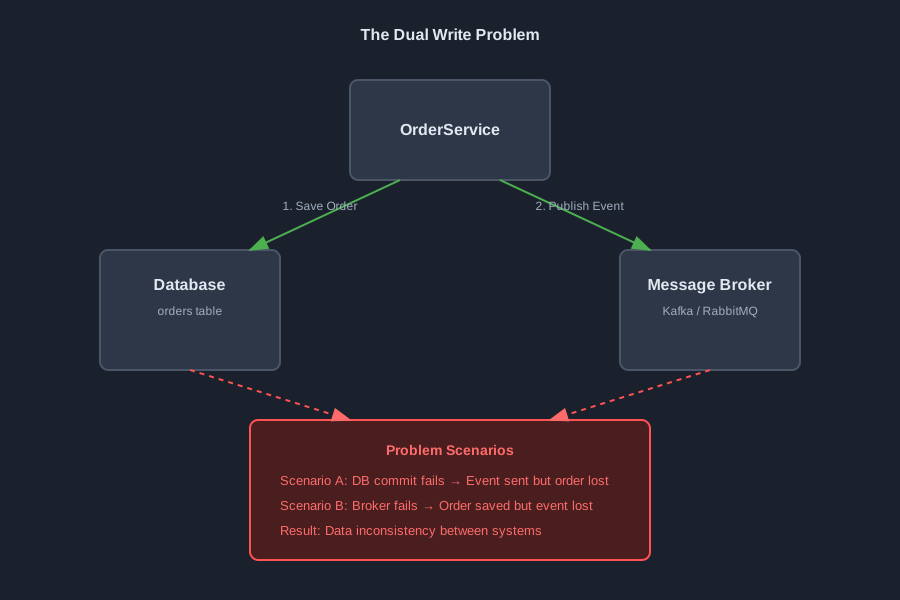
The dual write problem manifests in several failure scenarios:
Scenario A: Database Commit Fails
Scenario B: Message Broker Fails
Scenario C: Partial Success (Even Worse)
Even if you try to reorder the operations (send message first, then save to DB), you still face the same problem—just with the failure scenarios reversed. The fundamental issue is that you cannot coordinate a transaction across two different systems without distributed transaction protocols, which come with significant performance and complexity costs.
Two-Phase Commit (2PC) protocols can theoretically solve this problem, but they introduce:
For these reasons, the industry has moved away from distributed transactions in favor of patterns like the Outbox Pattern.
The Outbox Pattern (also known as the Transactional Outbox Pattern) solves the dual write problem by using your database's transaction capabilities to ensure atomicity. Instead of sending the message directly to the broker, you save the message to a table in the same database as your business data.
Since the orders table and the outbox table are in the same database, you can wrap writes to both in a single ACID transaction. This guarantees that either both writes succeed, or both fail—eliminating the inconsistency problem.
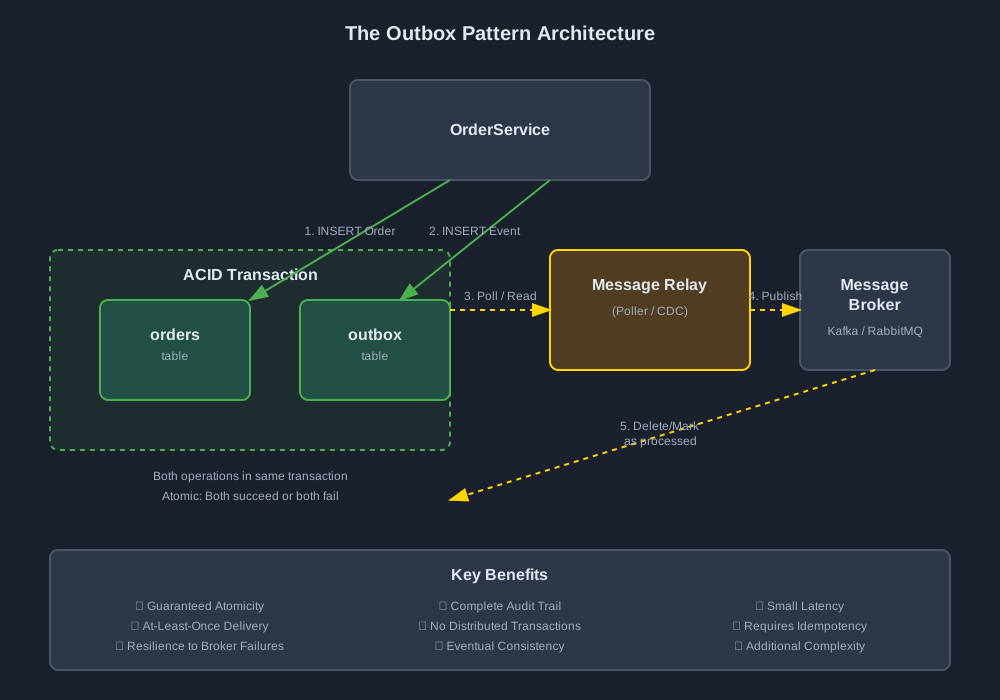
The pattern consists of two main phases:
Order into the orders table.outbox table within the same transaction.This phase ensures atomicity—the core guarantee that solves the dual write problem.
outbox table and publishes messages to the Message Broker.outbox table.This phase handles the actual message publishing asynchronously, decoupling it from the business transaction.
1. Outbox Table A dedicated table in your database that stores events waiting to be published. Each row represents a message that needs to be sent to the message broker.
2. Message Relay A background process that reads events from the outbox and publishes them. There are two common ways to implement this:
3. Business Service Your application service that writes both business data and events to the outbox within a single transaction.
Let's implement a complete Outbox Pattern solution using Spring Boot. We'll use the Polling Publisher approach, which is simpler to understand and implement.
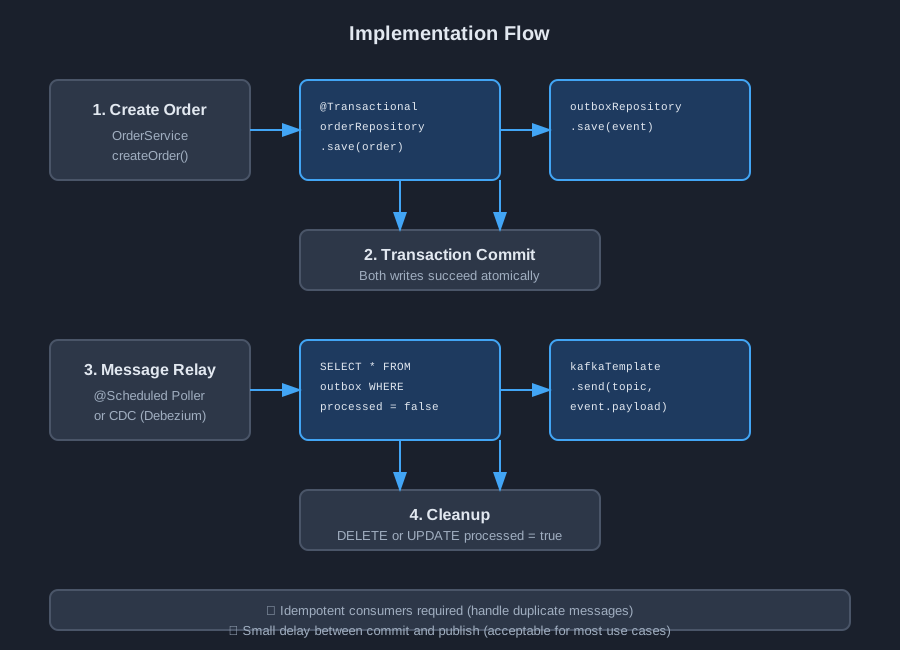
First, create a table to hold your events. The schema should include fields for identifying the event, its type, payload, and processing status.
CREATE TABLE outbox (
    id UUID PRIMARY KEY,
    aggregate_type VARCHAR(255) NOT NULL,
    aggregate_id VARCHAR(255) NOT NULL,
    type VARCHAR(255) NOT NULL,
    payload TEXT NOT NULL,
    created_at TIMESTAMP NOT NULL DEFAULT CURRENT_TIMESTAMP,
    processed BOOLEAN NOT NULL DEFAULT FALSE,
    processed_at TIMESTAMP,
    INDEX idx_outbox_unprocessed (processed, created_at)
);
Key Design Decisions:
id: Unique identifier for each eventaggregate_type and aggregate_id: Help identify which business entity the event relates totype: The event type (e.g., "ORDER_CREATED", "ORDER_CANCELLED")payload: The serialized event data (JSON)processed: Flag to track whether the event has been published(processed, created_at): Optimizes queries for unprocessed eventsCreate a JPA entity to represent the outbox table:
@Entity
@Table(name = "outbox")
public class OutboxEvent {
    @Id
    private UUID id;

    @Column(name = "aggregate_type", nullable = false)
    private String aggregateType;

    @Column(name = "aggregate_id", nullable = false)
    private String aggregateId;

    @Column(nullable = false)
    private String type;

    @Lob
    @Column(nullable = false)
    private String payload;

    @Column(name = "created_at", nullable = false)
    private LocalDateTime createdAt;

    @Column(nullable = false)
    private Boolean processed = false;

    @Column(name = "processed_at")
    private LocalDateTime processedAt;

    // Constructors, Getters, Setters
    public OutboxEvent() {}

    public OutboxEvent(UUID id, String aggregateType, String aggregateId,
                      String type, String payload) {
        this.id = id;
        this.aggregateType = aggregateType;
        this.aggregateId = aggregateId;
        this.type = type;
        this.payload = payload;
        this.createdAt = LocalDateTime.now();
        this.processed = false;
    }
}
Create a Spring Data JPA repository with a custom query method:
@Repository
public interface OutboxRepository extends JpaRepository<OutboxEvent, UUID> {

    @Query("SELECT e FROM OutboxEvent e WHERE e.processed = false ORDER BY e.createdAt ASC")
    List<OutboxEvent> findUnprocessedEvents(Pageable pageable);

    @Modifying
    @Query("UPDATE OutboxEvent e SET e.processed = true, e.processedAt = :processedAt WHERE e.id = :id")
    void markAsProcessed(@Param("id") UUID id, @Param("processedAt") LocalDateTime processedAt);
}
Modify your OrderService to save events to the outbox instead of publishing directly:
@Service
@RequiredArgsConstructor
@Slf4j
public class OrderService {

    private final OrderRepository orderRepository;
    private final OutboxRepository outboxRepository;
    private final ObjectMapper objectMapper;

    @Transactional
    public void createOrder(Order order) {
        // 1. Save Business Data
        Order savedOrder = orderRepository.save(order);
        log.info("Order created: {}", savedOrder.getId());

        // 2. Save Event to Outbox (Same Transaction)
        OutboxEvent event = createOutboxEvent(savedOrder);
        outboxRepository.save(event);
        log.info("Event saved to outbox: {}", event.getId());

        // Transaction commits here - both order and event are saved atomically
    }

    private OutboxEvent createOutboxEvent(Order order) {
        try {
            OrderCreatedEvent eventData = new OrderCreatedEvent(
                order.getId(),
                order.getCustomerId(),
                order.getTotalAmount(),
                order.getItems()
            );

            String payload = objectMapper.writeValueAsString(eventData);

            return new OutboxEvent(
                UUID.randomUUID(),
                "ORDER",
                order.getId().toString(),
                "ORDER_CREATED",
                payload
            );
        } catch (JsonProcessingException e) {
            throw new RuntimeException("Error creating outbox event", e);
        }
    }
}
Key Points:
orderRepository.save() and outboxRepository.save() are called within the same @Transactional methodCreate a scheduled task that polls the outbox table and publishes messages.
[!IMPORTANT] Concurrency Control: In a real-world scenario with multiple instances of your service running, you must ensure that multiple instances don't pick up and process the same event simultaneously. The example below is simplified.
@Component
@RequiredArgsConstructor
@Slf4j
public class OutboxRelay {

    private final OutboxRepository outboxRepository;
    private final KafkaTemplate<String, String> kafkaTemplate;

    @Scheduled(fixedDelay = 2000) // Run every 2 seconds
    // @SchedulerLock(name = "OutboxRelay_processOutbox") // Example using ShedLock
    public void processOutbox() {
        Pageable pageable = PageRequest.of(0, 50); // Process 50 events at a time
        List<OutboxEvent> events = outboxRepository.findUnprocessedEvents(pageable);

        if (events.isEmpty()) {
            return;
        }

        log.info("Processing {} outbox events", events.size());

        for (OutboxEvent event : events) {
            try {
                // Publish to Kafka
                SendResult<String, String> result = kafkaTemplate
                    .send("orders", event.getPayload())
                    .get(5, TimeUnit.SECONDS); // Wait for acknowledgment

                // Mark as processed after successful publish
                outboxRepository.markAsProcessed(event.getId(), LocalDateTime.now());

                log.info("Published event {} to topic 'orders'", event.getId());
            } catch (Exception e) {
                log.error("Failed to publish event: {}", event.getId(), e);
                // Event remains in outbox for retry on next run
                // Consider implementing exponential backoff or dead letter queue
            }
        }
    }
}
Don't forget to enable scheduling in your Spring Boot application:
@SpringBootApplication
@EnableScheduling
public class OrderServiceApplication {
    public static void main(String[] args) {
        SpringApplication.run(OrderServiceApplication.class, args);
    }
}
We implemented the Polling approach above, but there is another powerful way to implement the Message Relay: Change Data Capture (CDC).
SELECT * FROM outbox WHERE processed = false).Recommendation: Start with Polling for most use cases. Switch to CDC (Debezium) only if you have high throughput requirements (e.g., thousands of events per second) or strict latency SLAs.
Once a message is published, what should you do with the outbox record?
Trade-off: If you keep all history, the table will grow indefinitely, slowing down queries. A common compromise is to mark as processed initially, and then have a separate cleanup job that archives or deletes records older than X days (e.g., 7 days).
For events that consistently fail to publish, implement a dead letter queue:
private static final int MAX_RETRIES = 3;

public void processOutbox() {
    // ... existing code ...

    for (OutboxEvent event : events) {
        try {
            // ... publish logic ...
        } catch (Exception e) {
            event.incrementRetryCount();
            if (event.getRetryCount() >= MAX_RETRIES) {
                moveToDeadLetterQueue(event);
            } else {
                outboxRepository.save(event); // Update retry count
            }
        }
    }
}
The Outbox Pattern is ideal when:
The Outbox Pattern is a robust, well-established solution for the Dual Write problem in microservices architecture. While it introduces some complexity, the guarantee of data consistency is often worth the trade-off.
To stay updated with the latest updates in software development, follow us on LinkedIn and Medium.
Learn about the top resilience patterns in microservices and how to implement them in Spring Boot. This guide covers circuit breakers, retries, timeouts, bulkheads, and more.
A comprehensive guide to the Event Sourcing pattern, covering core concepts, a practical Java implementation, popular frameworks, and the pros and cons of this powerful architectural style.
Find the most popular YouTube creators in tech categories like AI, Java, JavaScript, Python, .NET, and developer conferences. Perfect for learning, inspiration, and staying updated with the best tech content.

Get instant AI-powered summaries of YouTube videos and websites. Save time while enhancing your learning experience.
