HTTP cookies (or simply cookies) are small pieces of data that a server sends to a user's web browser. The browser may store them and send them back with later requests to the same server. They are a fundamental part of the modern web, enabling essential features like session management, personalization, and user tracking.
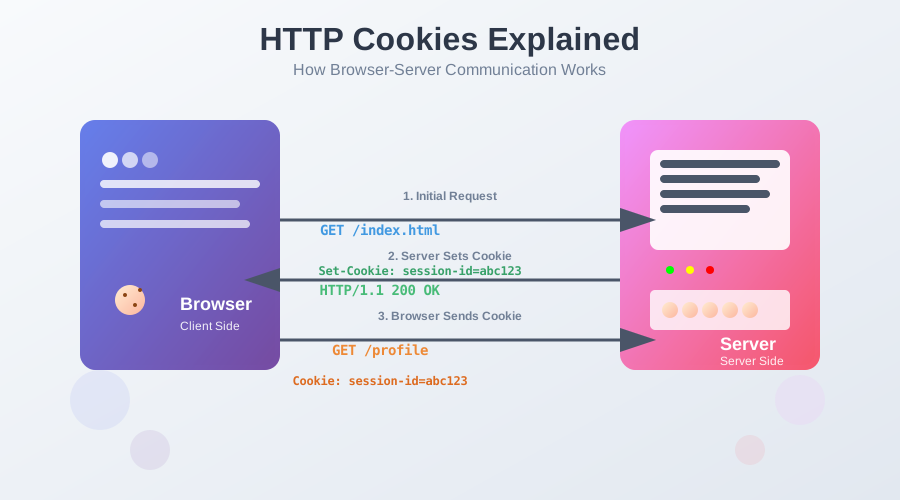
The process begins when a server wants to store information on the client. It includes a Set-Cookie header in its HTTP response. The browser receives this response, stores the cookie, and then includes a Cookie header in all subsequent HTTP requests to that same server.
This flow allows the server to maintain a "memory" of the user across multiple requests, which are otherwise stateless.
Here’s a visual representation of the cookie flow:
Set-Cookie: The server responds with the requested resource and includes a Set-Cookie header. For example: Set-Cookie: user_id=12345;.Cookie: For every subsequent request to the same server, the browser automatically includes the Cookie header with the stored value. For example: Cookie: user_id=12345;.A cookie isn't just a simple key-value pair. It has several attributes that control its behavior, lifetime, and security. These are set by the server in the Set-Cookie header.
Here are the most important attributes:
| Attribute | Purpose | Details / Values |
|---|---|---|
| Expires Max-Age | Controls cookie lifetime |
Expires: Sets a specific expiration date/time. Max-Age: Sets duration in seconds from set time. If both are set, Max-Age takes precedence. If neither, cookie is a session cookie (deleted when browser closes). |
| Domain | Specifies which hosts receive the cookie | Defaults to the host that set the cookie. Not sent to subdomains unless specified. |
| Path | Scopes cookie to a URL path |
E.g., Path=/app means cookie sent only for /app and its subdirectories.
|
| Secure | Restricts cookie to HTTPS | Cookie sent only over encrypted (HTTPS) connections. |
| HttpOnly | Prevents JS access |
Not accessible via document.cookie in JavaScript. Helps prevent XSS attacks.
|
| SameSite | CSRF protection |
Controls cross-site sending: Strict: Only sent with same-site requests. Lax: (Default) Sent with same-site and top-level GET navigations. None: Sent with all requests (must also set Secure). |
You can interact with non-HttpOnly cookies using JavaScript through the document.cookie property.
To create a cookie, you assign a string to document.cookie that includes the key-value pair and any desired attributes.
// Basic cookie
document.cookie = "username=JohnDoe";

// Cookie with expiration and path
const expirationDate = new Date();
expirationDate.setDate(expirationDate.getDate() + 7); // Expires in 7 days
document.cookie = `theme=dark; expires=${expirationDate.toUTCString()}; path=/`;
document.cookie returns a single string containing all cookies for the current document, separated by semicolons. You need to parse this string to get a specific value.
function getCookie(name) {
    const cookies = document.cookie.split(';').map(cookie => cookie.trim());
    for (const cookie of cookies) {
        const [cookieName, cookieValue] = cookie.split('=');
        if (cookieName === name) {
            return decodeURIComponent(cookieValue);
        }
    }
    return null;
}

const username = getCookie('username'); // "JohnDoe"
To delete a cookie, you set its Expires attribute to a past date.
document.cookie = "username=; expires=Thu, 01 Jan 1970 00:00:00 GMT; path=/";
Managing cookies on the server is more robust and secure, especially with the HttpOnly attribute. Here’s how to do it in Node.js using the popular cookie-parser middleware for Express.
First, install the necessary packages:
npm install express cookie-parser
The res.cookie() method makes it easy to set cookies and their attributes.
const express = require('express');
const cookieParser = require('cookie-parser');

const app = express();
app.use(cookieParser());

app.get('/login', (req, res) => {
    // Set a simple cookie
    res.cookie('username', 'JohnDoe', { maxAge: 900000, httpOnly: true });

    // Set a secure, SameSite cookie for sensitive data
    res.cookie('session_id', 'xyz789', {
        maxAge: 86400000, // 24 hours
        httpOnly: true,
        secure: true, // Only send over HTTPS
        sameSite: 'Strict'
    });

    res.send('Cookies have been set!');
});

app.listen(3000, () => console.log('Server running on port 3000'));
app.get('/profile', (req, res) => {
    const username = req.cookies.username;
    if (username) {
        res.send(`Welcome back, ${username}!`);
    } else {
        res.send('Please log in.');
    }
});
The res.clearCookie() method deletes a cookie by its name.
app.get('/logout', (req, res) => {
    res.clearCookie('username');
    res.clearCookie('session_id');
    res.send('Logged out successfully.');
});
Spring Boot provides excellent, built-in support for handling cookies via the HttpServletRequest and HttpServletResponse objects, or more elegantly with @CookieValue annotations.
You create a Cookie object and add it to the HttpServletResponse.
import org.springframework.web.bind.annotation.GetMapping;
import org.springframework.web.bind.annotation.RestController;
import javax.servlet.http.Cookie;
import javax.servlet.http.HttpServletResponse;

@RestController
public class CookieController {

    @GetMapping("/login")
    public String setCookie(HttpServletResponse response) {
        // Create a cookie
        Cookie userCookie = new Cookie("username", "JaneDoe");
        userCookie.setMaxAge(7 * 24 * 60 * 60); // 7 days
        userCookie.setHttpOnly(true);
        userCookie.setPath("/"); // Global cookie

        // Create a secure cookie for session
        Cookie sessionCookie = new Cookie("session_id", "abc456");
        sessionCookie.setMaxAge(24 * 60 * 60); // 24 hours
        sessionCookie.setHttpOnly(true);
        sessionCookie.setSecure(true); // Requires HTTPS
        // In Spring, SameSite is configured globally or via HttpHeaders

        // Add cookies to the response
        response.addCookie(userCookie);
        response.addCookie(sessionCookie);

        return "Cookies have been set!";
    }
}
The easiest way to read a cookie in a Spring controller is with the @CookieValue annotation.
import org.springframework.web.bind.annotation.CookieValue;
import org.springframework.web.bind.annotation.GetMapping;
import org.springframework.web.bind.annotation.RestController;

@RestController
public class ProfileController {

    @GetMapping("/profile")
    public String readCookie(
            @CookieValue(name = "username", defaultValue = "Guest") String username) {
        return "Welcome back, " + username + "!";
    }
}
To delete a cookie, you create a cookie with the same name and set its maxAge to 0.
import org.springframework.web.bind.annotation.GetMapping;
import org.springframework.web.bind.annotation.RestController;
import javax.servlet.http.Cookie;
import javax.servlet.http.HttpServletResponse;

@RestController
public class LogoutController {

    @GetMapping("/logout")
    public String deleteCookie(HttpServletResponse response) {
        Cookie cookie = new Cookie("username", null); // value can be null
        cookie.setMaxAge(0); // 0 seconds
        cookie.setPath("/");

        response.addCookie(cookie);

        return "Logged out successfully.";
    }
}
Next.js provides powerful built-in utilities for handling cookies on both the client and server side.
Use the cookies() function from next/headers to set cookies in server components or API routes.
import { cookies } from 'next/headers';

// In a Server Component or API Route
export async function POST(request: Request) {
  const cookieStore = cookies();

  // Set a simple cookie
  cookieStore.set('username', 'JohnDoe', {
    maxAge: 7 * 24 * 60 * 60, // 7 days
    httpOnly: true,
    secure: process.env.NODE_ENV === 'production',
    sameSite: 'strict',
    path: '/'
  });

  // Set a session cookie
  cookieStore.set('session_id', 'xyz789', {
    maxAge: 24 * 60 * 60, // 24 hours
    httpOnly: true,
    secure: true,
    sameSite: 'strict'
  });

  return Response.json({ message: 'Cookies set successfully' });
}
Access cookies directly in server components using the cookies() function.
import { cookies } from 'next/headers';

export default async function ProfilePage() {
  const cookieStore = cookies();
  const username = cookieStore.get('username')?.value || 'Guest';
  const sessionId = cookieStore.get('session_id')?.value;

  return (
    <div>
      <h1>Welcome back, {username}!</h1>
      {sessionId && <p>Session ID: {sessionId}</p>}
    </div>
  );
}
Cookies are a cornerstone of modern web development, enabling stateful interactions over the stateless HTTP protocol. While client-side manipulation is possible, best practices dictate that cookies, especially those containing sensitive information, should be managed on the server with the HttpOnly, Secure, and SameSite attributes to enhance security.
For more in-depth tutorials on modern software development practices, follow me for more content:
🔗 Blog 🔗 LinkedIn 🔗 Medium 🔗 Github
Stay tuned for more content on the latest in AI and software engineering!
Understanding and configuring CORS in a Java Spring backend.
Complete guide to HTTP protocol evolution. Compare HTTP/0.9, HTTP/1.0, HTTP/1.1, HTTP/2, and HTTP/3 with improvements and use cases.
Find the most popular YouTube creators in tech categories like AI, Java, JavaScript, Python, .NET, and developer conferences. Perfect for learning, inspiration, and staying updated with the best tech content.

Get instant AI-powered summaries of YouTube videos and websites. Save time while enhancing your learning experience.
