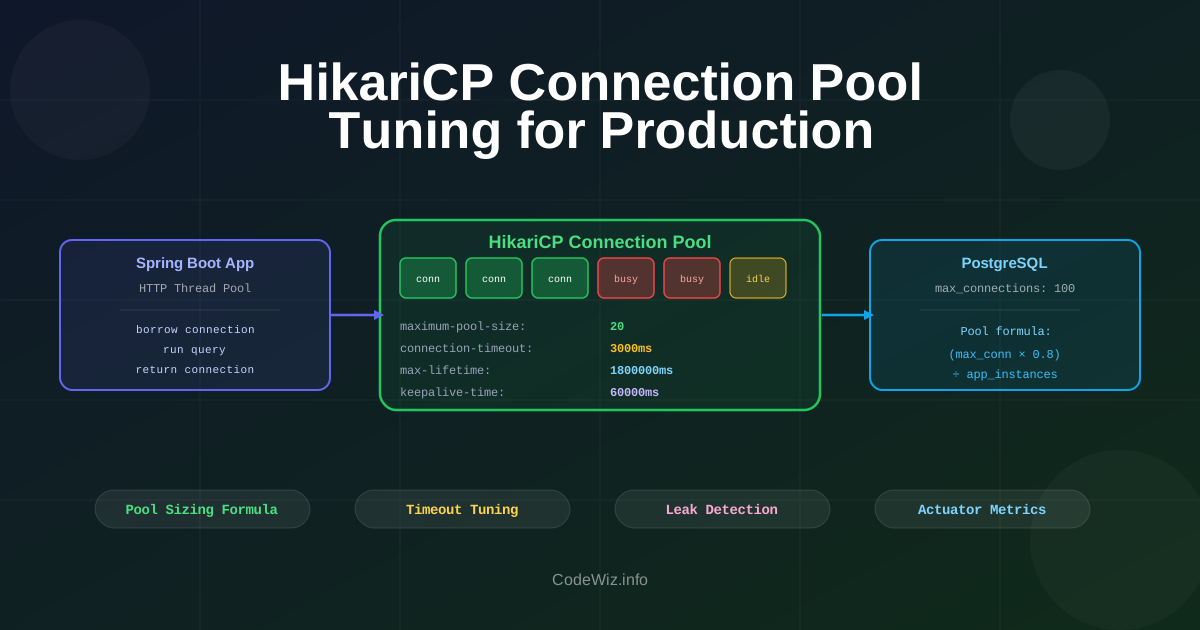
Spring Boot auto-configures HikariCP with a connection pool of 10. For a small app with low traffic this is fine. For a service handling 200 concurrent requests that each touch the database, 10 connections means 190 requests are queued waiting — and your response times spike even though your queries are fast.
Most developers set spring.datasource.url, start the app, and forget about the pool. Let's look at the settings that actually matter in production: how to size the pool correctly, what the timeout settings do, how to detect leaks, and what to monitor.
Without pooling, every database operation opens a TCP connection, authenticates, runs the query, and closes the connection. Opening a connection takes around 20–100ms depending on the database and network. At scale, that overhead can be significant.
HikariCP maintains a pool of open, authenticated connections. A request borrows one from the pool, runs its queries, and returns it. The connection stays open and warm. The typical borrow/return overhead is under 1ms.
Here's the full configuration section with everything labeled:
spring:
  datasource:
    url: jdbc:postgresql://localhost:5432/mydb
    username: app_user
    password: ${DB_PASSWORD}
    hikari:
      # Pool sizing
      maximum-pool-size: 20         # Max connections HikariCP will hold
      minimum-idle: 5               # Connections kept open when idle

      # Timeouts
      connection-timeout: 3000      # Wait time to get a connection (ms) — default 30000
      idle-timeout: 600000          # How long an idle connection lives (ms) — 10 min
      max-lifetime: 1800000         # Max connection age (ms) — 30 min, must be < DB timeout
      keepalive-time: 60000         # Ping idle connections to prevent firewall cuts (ms)

      # Debugging
      connection-test-query: SELECT 1   # validation query (JDBC4 drivers don't need this)
      pool-name: MyApp-Pool             # shows in logs and JMX
      leak-detection-threshold: 5000    # warn if connection not returned within 5s
The default of 10 is often wrong in both directions — too small for high-concurrency services, and too large if you have many app instances sharing one database.
A rough starting point from the HikariCP author and PostgreSQL docs:
pool size = (cores × 2) + effective_spindle_count
For a 4-core app server talking to a network database (no spindles): (4 × 2) + 1 = 9. The PostgreSQL team uses a similar formula and recommends not exceeding your max_connections divided by the number of app instances.
app_pool_size = (db.max_connections × 0.8) / num_app_instances
For PostgreSQL with max_connections = 100 and 3 app instances:
(100 × 0.8) / 3 = ~26 connections per instance
This keeps 20% headroom for migrations, admin tasks, monitoring connections.
For mostly IO-bound workloads (typical REST APIs hitting a remote database), connections spend most of their time waiting for the database to respond. A larger pool helps by overlapping that wait time. Don't go above ~50 per instance — at that point, the database itself becomes the bottleneck and you're just shifting the queue.
For CPU-bound queries (heavy aggregations, analytics), the database can only run as many queries in parallel as it has cores. Adding more connections doesn't help — it adds context switching overhead.
Virtual threads mean you can have thousands of concurrent HTTP requests. But if your pool is 10, all those virtual threads compete for 10 connections. Your pool size still matters — increase it to match your concurrency target.
hikari:
  maximum-pool-size: 50    # support higher virtual-thread concurrency
  minimum-idle: 10
Getting these wrong causes either connection timeouts in production or stale connection errors on Monday morning after a weekend of low traffic.
connection-timeout (default: 30,000ms — too long)How long a thread waits for a connection from the pool before throwing SQLTransientConnectionException. The default 30 seconds means a user request can hang for 30 seconds before getting an error. Set this to 3,000–5,000ms so failures surface quickly.
connection-timeout: 3000 # fail fast, don't keep users waiting 30s
max-lifetime (default: 1,800,000ms — usually fine)Maximum age of a connection before HikariCP retires it. This must be shorter than your database's wait_timeout (MySQL) or tcp_keepalives_idle (PostgreSQL). If the database closes a connection due to inactivity and HikariCP doesn't know, the next borrow gets a broken connection.
Check your database timeout setting and set max-lifetime 30–60 seconds below it:
# PostgreSQL default tcp keepalives: varies, often 7200s (2h)
# MySQL default wait_timeout: 28800s (8h)
max-lifetime: 1800000   # 30 min — well within both defaults
idle-timeout (default: 600,000ms)How long a connection can sit idle before being removed from the pool (down to minimum-idle). Relevant for services with variable load — keep it shorter to release connections back to the database during off-peak hours.
keepalive-time (default: 0 — disabled)HikariCP pings idle connections on this interval to prevent firewalls and proxies from cutting the TCP connection silently. Essential in cloud environments (AWS RDS, Azure, GCP) where network infrastructure aggressively closes idle TCP connections.
keepalive-time: 60000 # ping every 60s, adjust based on your cloud firewall timeout
A connection leak happens when code borrows a connection and never returns it — usually because a transaction wasn't committed/rolled back, or an exception was thrown before the connection was released.
Symptoms: pool exhaustion under low load, requests hanging, log messages like:
HikariPool-1 - Connection is not available, request timed out after 3000ms
Enable leak detection:
hikari:
  leak-detection-threshold: 5000  # warn if connection held > 5s
HikariCP will log a warning with a stack trace showing where the connection was borrowed. Look for:
@Transactional on service methods that need a transactionEntityManager that wasn't closedConnection objects obtained directly without try-with-resources// Leak source: connection opened, exception thrown, never closed Connection conn = dataSource.getConnection(); String result = runQuery(conn); // if this throws, conn is never closed // Fixed: try-with-resources try (Connection conn = dataSource.getConnection()) { return runQuery(conn); }
Metrics you need to watch:
| Metric | Normal | Warning |
|---|---|---|
hikaricp.connections.active | < 80% of max | > 90% of max consistently |
hikaricp.connections.pending | 0 | > 0 sustained |
hikaricp.connections.timeout | 0 | Any > 0 |
hikaricp.connections.acquire (ms) | < 5ms | > 100ms |
HikariCP exposes these via JMX and Spring Actuator. Enable Micrometer integration:
management:
  endpoints:
    web:
      exposure:
        include: health, metrics
Then query:
GET /actuator/metrics/hikaricp.connections.active
GET /actuator/metrics/hikaricp.connections.pending
GET /actuator/metrics/hikaricp.connections.timeout
In Grafana, graph hikaricp.connections.active and hikaricp.connections.pending together. If pending is ever non-zero, your pool is undersized for that traffic level.
For structured logging, HikariCP logs pool stats at DEBUG level. Add this to get pool state every 30 seconds:
logging.level.com.zaxxer.hikari=DEBUG
logging.level.com.zaxxer.hikari.HikariConfig=DEBUG
If you have multiple databases (read replica, analytics DB, etc.), configure separate pools:
@Configuration
public class DataSourceConfig {

    @Bean
    @Primary
    @ConfigurationProperties("spring.datasource.primary.hikari")
    public HikariDataSource primaryDataSource() {
        return DataSourceBuilder.create().type(HikariDataSource.class).build();
    }

    @Bean
    @ConfigurationProperties("spring.datasource.readonly.hikari")
    public HikariDataSource readonlyDataSource() {
        return DataSourceBuilder.create().type(HikariDataSource.class).build();
    }
}
spring:
  datasource:
    primary:
      url: jdbc:postgresql://primary-db:5432/mydb
      hikari:
        maximum-pool-size: 20
        pool-name: Primary-Pool
    readonly:
      url: jdbc:postgresql://replica-db:5432/mydb
      hikari:
        maximum-pool-size: 10   # read-only, smaller pool fine
        pool-name: ReadOnly-Pool
spring:
  datasource:
    hikari:
      maximum-pool-size: 20           # sized for your concurrency, not default 10
      minimum-idle: 5                 # keep some warm, don't hold all 20
      connection-timeout: 3000        # fail fast, not 30s
      max-lifetime: 1800000           # below your DB's connection timeout
      keepalive-time: 60000           # essential in cloud environments
      leak-detection-threshold: 5000  # catch leaks in staging
      pool-name: ${spring.application.name}-Pool  # visible in logs
The most common production improvements in order of impact:
connection-timeout from 30s to 3s — the easiest win, immediate improvement in failure detection(db.max_connections × 0.8) / instanceskeepalive-time if running on any cloud database serviceleak-detection-threshold in staging to find leaks before they hit productionconnections.pending > 0 and connections.timeout > 0Common JPA performance anti-patterns that slow Spring apps: N+1 queries, eager loading, bad pagination, saveAndFlush, bags, caching, projections, and OSIV.
Comprehensive guide to Spring Data JPA with practical examples and best practices. Learn how to effectively use JPA in Spring Boot applications.
Complete guide to database indexes for developers. Learn how indexes work, types of indexes, and optimization strategies for better performance.
Learn the basics of API caching and how to implement different caching strategies in a Spring Boot application. We will cover in-memory caching and distributed caching with Redis to improve the performance of your APIs.
Find the most popular YouTube creators in tech categories like AI, Java, JavaScript, Python, .NET, and developer conferences. Perfect for learning, inspiration, and staying updated with the best tech content.

Get instant AI-powered summaries of YouTube videos and websites. Save time while enhancing your learning experience.
