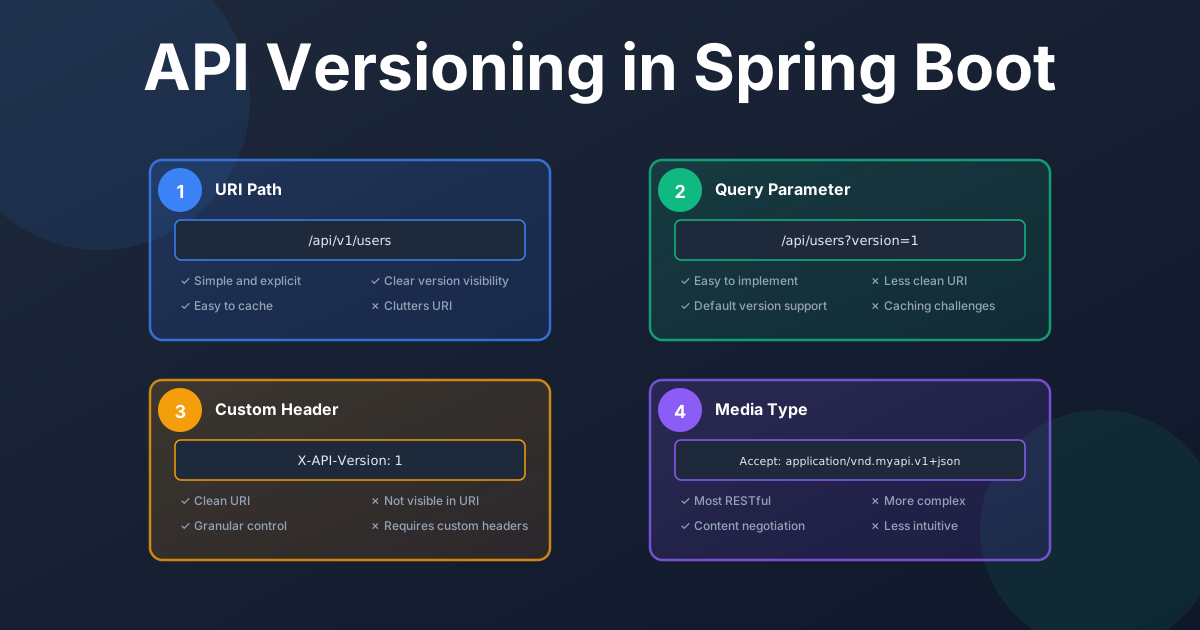
As APIs evolve, managing changes without breaking client applications is a critical challenge. API versioning is the practice of managing these changes in a way that provides stability for consumers. In this guide, we'll explore why API versioning is necessary, common techniques, how to implement them in Spring Boot, and best practices for creating a robust versioning strategy.
API versioning is the process of assigning unique version numbers to your API. As you introduce new features or make breaking changes, you can release a new version of your API while allowing existing clients to continue using the older version. This ensures that you don't disrupt services for your users.
Versioning serves several critical purposes. It prevents breaking changes by providing a graceful way to introduce modifications that might otherwise disrupt client applications. When different clients upgrade at different paces, versioning allows you to support multiple versions simultaneously, ensuring no client is left behind. A version number clearly communicates the state of your API to consumers, and enables phased rollouts where new versions can be tested with a small group before broader deployment.
Both Microsoft's API guidelines and Google's API Design Guide emphasize that versioning should be used judiciously—primarily for managing breaking changes rather than every feature addition. The key principle is to maintain backward compatibility whenever possible and only introduce new versions when necessary.
There are several popular strategies for versioning a REST API. Let's explore the most common ones.
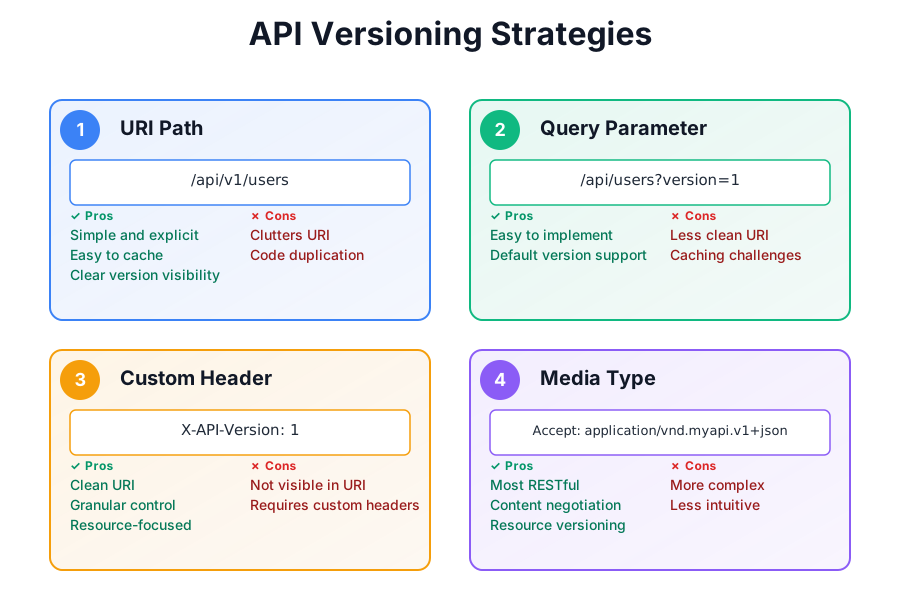
This is the most straightforward and common approach, where the version number is included directly in the URI path, such as /api/v1/products and /api/v2/products. The version is clearly visible in the URI, making it easy for clients to switch between versions and for caching systems to handle different versions separately. However, this approach clutters the URI and can lead to code duplication, requiring separate controller methods or classes for each version.
With this strategy, the API version is specified as a query parameter, like /api/products?version=1 or /api/products?version=2. This approach is simple to implement and allows for a default version when the parameter is omitted. The trade-off is that the version parameter clutters the URI, and caching proxies may not handle query parameters as effectively as URI paths.
In this strategy, the version is passed in a custom HTTP header such as X-API-Version: 1 or X-API-Version: 2. This keeps the URI clean and focused on the resource while allowing for more granular control over versioning individual operations. The downside is that it's less obvious which version is being used from the URI alone, and clients need to know the specific header to use.
This is the most RESTful approach, where the version is included in the Accept header, for example Accept: application/vnd.myapi.v1+json. This aligns with the principles of content negotiation and allows for versioning individual resource representations. However, it's more complex to implement and use, especially for browser-based testing, and is less commonly understood compared to other methods.
In earlier versions of Spring Boot, there was no built-in, opinionated way to handle API versioning. Developers had to implement versioning manually using Spring's flexible request mapping capabilities. While this approach works, it required repetitive code and custom logic to handle different versions.
You can include the version as part of the @RequestMapping path.
@RestController
public class ProductController {

    @GetMapping("/api/v1/products")
    public String getProductsV1() {
        return "Products from API version 1";
    }

    @GetMapping("/api/v2/products")
    public String getProductsV2() {
        return "Products from API version 2";
    }
}
You can use the params attribute of the @GetMapping annotation to differentiate between versions.
@RestController
@RequestMapping("/api/products")
public class ProductController {

    @GetMapping(params = "version=1")
    public String getProductsV1() {
        return "Products from API version 1";
    }

    @GetMapping(params = "version=2")
    public String getProductsV2() {
        return "Products from API version 2";
    }
}
Similarly, you can use the headers attribute to check for a specific header value.
@RestController
@RequestMapping("/api/products")
public class ProductController {

    @GetMapping(headers = "X-API-VERSION=1")
    public String getProductsV1() {
        return "Products from API version 1";
    }

    @GetMapping(headers = "X-API-VERSION=2")
    public String getProductsV2() {
        return "Products from API version 2";
    }
}
You can use the produces attribute to specify the media type for each version.
@RestController
@RequestMapping("/api/products")
public class ProductController {

    @GetMapping(produces = "application/vnd.myapi.v1+json")
    public String getProductsV1() {
        return "Products from API version 1";
    }

    @GetMapping(produces = "application/vnd.myapi.v2+json")
    public String getProductsV2() {
        return "Products from API version 2";
    }
}
With the introduction of Spring Framework 7, API versioning has been significantly streamlined through native support. The framework now provides an ApiVersionStrategy that centralizes the configuration and management of API versions. This eliminates the need for manual version resolution logic and reduces code duplication.
You can configure API versioning by implementing WebMvcConfigurer and overriding the configureApiVersioning method:
@Configuration
public class WebConfiguration implements WebMvcConfigurer {

    @Override
    public void configureApiVersioning(ApiVersionConfigurer configurer) {
        configurer.useRequestHeader("API-Version");
    }
}
This configuration tells Spring to extract the API version from the "API-Version" request header. You can configure other strategies as well: use configurer.useQueryParam("version") for query parameter-based versioning, configurer.usePathSegment() for path segment versioning, or configurer.useMediaTypeParameter() for media type-based versioning.
For Spring Boot applications, you can configure this using properties in application.properties:
spring.mvc.apiversion.use.header=API-Version
Once configured, you can specify the API version directly in your controller mappings using the new version attribute:
@RestController
public class ProductController {

    @GetMapping(path = "/products/{id}", version = "1")
    public Product getProductV1(@PathVariable String id) {
        return productService.getProduct(id);
    }

    @GetMapping(path = "/products/{id}", version = "2")
    public ProductV2 getProductV2(@PathVariable String id) {
        return productService.getProductV2(id);
    }
}
This approach is much cleaner than the traditional method. You don't need separate endpoints or complex request mapping conditions—Spring handles the version routing automatically based on your configuration.
Spring Framework 7 also supports versioning in functional endpoints using the version() request predicate:
@Bean
public RouterFunction<ServerResponse> productRoutes() {
    return RouterFunctions.route()
        .GET("/products/{id}", version("1"),
            request -> {
                String id = request.pathVariable("id");
                return ServerResponse.ok().body(productService.getProduct(id));
            })
        .GET("/products/{id}", version("2"),
            request -> {
                String id = request.pathVariable("id");
                return ServerResponse.ok().body(productService.getProductV2(id));
            })
        .build();
}
API versioning isn't always necessary. You should use versioning when you have external clients that you don't control, when you need to make breaking changes that cannot be handled through backward-compatible evolution, or when you want to introduce significant new features without impacting existing clients.
Avoid versioning when your API is for internal use only and you can update all clients simultaneously, or when you can evolve your API in a backward-compatible way. For example, adding new optional fields, new optional query parameters, or new endpoints doesn't require versioning. Only introduce a new version when you need to remove or modify existing behavior that clients depend on.
Find the most popular YouTube creators in tech categories like AI, Java, JavaScript, Python, .NET, and developer conferences. Perfect for learning, inspiration, and staying updated with the best tech content.

Get instant AI-powered summaries of YouTube videos and websites. Save time while enhancing your learning experience.
